Introduction
This guide outlines how to replace the RAM in the Lenovo ThinkPad T570. Before proceeding, make sure the device is powered down and the battery is removed. There are many small and delicate parts on the inside of the computer, so use gentle and deliberate movements when working so the parts and pieces aren't damaged.
What you need
-
-
-
Switch the left latch to the left to unlock the battery.
-
While holding the right latch to the right, slide the battery away from the device.
 Ask FixBot
-
-
-
-
-
-
Loosen the seven captive screws on the back panel of the computer using a JIS #0 screwdriver.
-
Remove the back panel.
-
-
-
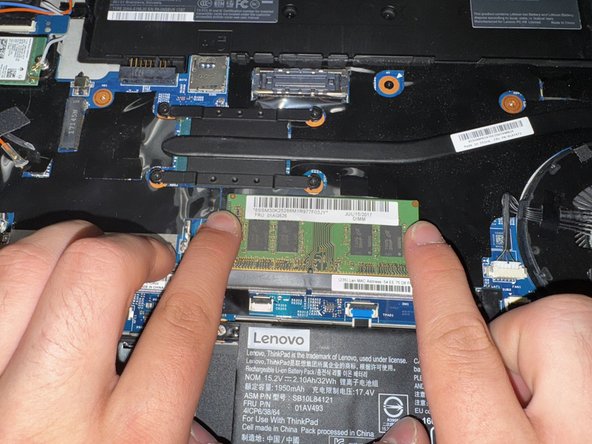
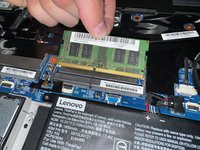
Push the clips outwards to release the RAM chip.
-
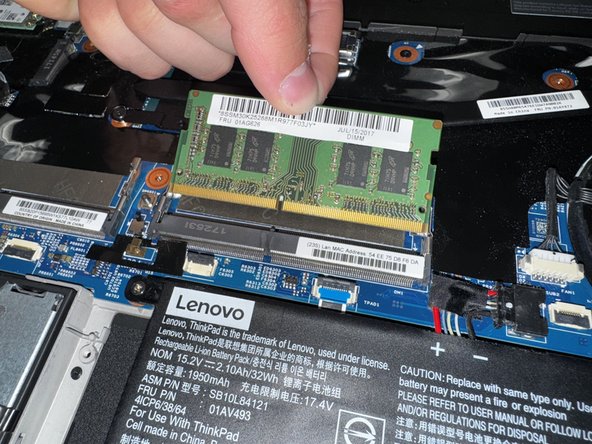
From there, take the chip out.
-
-


To reassemble your device, follow these instructions in reverse order.

Team

Utah Tech University, Team 1-3, Crenshaw Fall 2024 Member of Utah Tech University, Team 1-3, Crenshaw Fall 2024
UTAHTECH-CRENSHAW-F24S1G3
3 Members
48 Guides authored
