Introduction
This guide will help users replace the keyboard on the Lenovo ThinkPad T570. Before proceeding, make sure that the device is powered down and the screen is black. The keyboard is delicate and has a few fragile parts located underneath, so be sure to use gentle movements and not tug or jerk certain pieces as it may cause one of them to break.
What you need
-
-
-
Loosen the three captive screws on the bottom of the laptop with a Phillips #0 screwdriver
 Ask FixBot
-
-
-
-
Flip the computer over and open the screen.
-
You will see a gap between the bottom of the keyboard and where it attaches. Wedge the spudger in the gap and push the spudger toward the screen
-
Once the keyboard is detached, gently flip it over.
-
-
-
Flip the two black hinges upward and gently detach the pieces from the computer.
-
Remove the keyboard from the laptop.
-
-


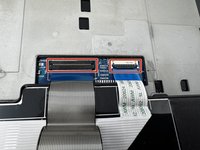
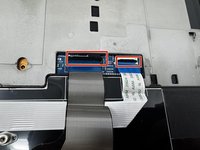
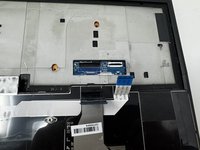
To reassemble your device, follow these instructions in reverse order.

Team

Utah Tech University, Team 1-3, Crenshaw Fall 2024 Member of Utah Tech University, Team 1-3, Crenshaw Fall 2024
UTAHTECH-CRENSHAW-F24S1G3
3 Members
48 Guides authored
