Free Shipping on Domestic Orders $75+

Lenovo ThinkPad T490 Touchpad Replacement

What you need

  1. Lenovo ThinkPad T490 Touchpad Replacement, Base Plate: step 1, image 1 of 1
    • Loosen the screws from the base plate.

    • Using a Philips #1 screwdriver fully loosen the six screws on the back cover.

    • These screws are captive - they will not fully come out after being unscrewed.

  2. Lenovo ThinkPad T490 Touchpad Replacement: step 2, image 1 of 1
    • Insert the iFixit opening tool into the space between the base plate and the chassis.

    • Glide the tool along the perimeter of the case in order to release the clips holding the case and chassis together.

  3. Lenovo ThinkPad T490 Touchpad Replacement: step 3, image 1 of 1
    • Grab the edge of the cover and lift the cover away from you.

    • There may be additional clips holding the cover in place. These remaining clips will release easily as you remove the cover.

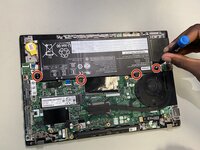
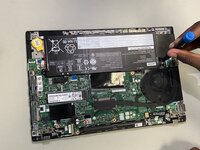
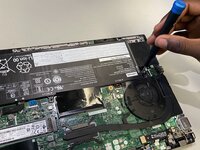
  4. Lenovo ThinkPad T490 Touchpad Replacement, Battery: step 4, image 1 of 3 Lenovo ThinkPad T490 Touchpad Replacement, Battery: step 4, image 2 of 3 Lenovo ThinkPad T490 Touchpad Replacement, Battery: step 4, image 3 of 3
    • Remove the four 3 mm screws securing the battery with a Phillips #00 screwdriver.

  5. Lenovo ThinkPad T490 Touchpad Replacement: step 5, image 1 of 1
    • Use tweezers or your fingernails to disconnect the battery from its motherboard socket.

  6. Lenovo ThinkPad T490 Touchpad Replacement: step 6, image 1 of 1
    • Lift up and remove the battery from the device.

  7. Lenovo ThinkPad T490 Touchpad Replacement, Touchpad: step 7, image 1 of 3 Lenovo ThinkPad T490 Touchpad Replacement, Touchpad: step 7, image 2 of 3 Lenovo ThinkPad T490 Touchpad Replacement, Touchpad: step 7, image 3 of 3
    • Use a Phillips #00 screwdriver to remove the four screws securing the touchpad.

  8. Lenovo ThinkPad T490 Touchpad Replacement: step 8, image 1 of 1
    • Use a pair of tweezers to flip up the black locking flap securing the touchpad ribbon cable.

    • Disconnect the ribbon cable.

  9. Lenovo ThinkPad T490 Touchpad Replacement: step 9, image 1 of 1
    • Carefully lift the laptop's base from the monitor. The touchpad will be left on the computer's screen.

Conclusion

To reassemble your device, follow the above steps in reverse order.
Take your e-waste to an R2 or e-Stewards certified recycler.
Repair didn’t go as planned? Try some basic troubleshooting or ask our Answers community for help.

Bryce Scholten

Member since: 10/26/25

277 Reputation

2 Guides authored

Team

UW Tacoma, Team E-6, Rose Fall 2025 Member of UW Tacoma, Team E-6, Rose Fall 2025

UWT-ROSE-F25SEG6

3 Members

2 Guides authored

0 Guide Comments

Add Comment

View Statistics:

Past 24 Hours: 6

Past 7 Days: 18

Past 30 Days: 70

All Time: 263