
Lenovo ThinkPad T480 Back Cover Replacement

Sarah Westberg and 2 other contributors
Last updated on Mar 25, 2024
Views: 15K
View statistics:
- Past 24 Hours:
- 9
- Past 7 Days:
- 60
- Past 30 Days:
- 259
- All Time:
- 14,877
Comments: 7
5 comments on steps, 2 guide comments.
Go to guide commentsCompleted: 10 11
10 people have marked this guide "completed." Will you be next?
11 people have marked this guide "completed." Including you — great job!
Favorites: 1 2
1 person has favorited (and subscribed to) this guide. Will you be next?
2 people have favorited (and subscribed to) this guide — including you!
Introduction
Go to step 1 ↓You may need to access the internals of your Lenovo ThinkPad T480 or you may want to replace the back cover because of damage. In either case, follow this guide to replace the back cover of your Lenovo ThinkPad T480.
Be sure to disable to internal battery, power off, and unplug the charging cable prior to beginning this guide.
What you need
Parts

Tools


-
-
-
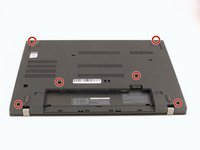
Flip the laptop over so the bottom of the device is showing.
 Ask FixBot
-
-
-
Using your fingers, slide the lock on each side of the battery to the unlocked position.
-
Remove the battery from the slot.
-
-
-
-
-
-
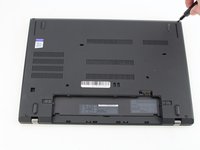
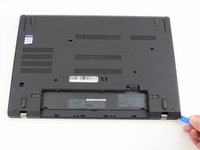
Insert the blue plastic opening tool into the space between the lower case and the chassis.
-
Slide the opening tool around the perimeter of the case to release the clips holding the case and the chassis together.
-
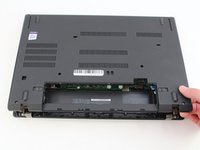
Remove the back case.
-




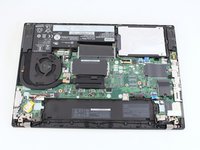
To reassemble your device, follow the above steps in reverse order.
Take your e-waste to an R2 or e-Stewards certified recycler.
Repair didn’t go as planned? Try some basic troubleshooting, or ask our Answers community for help.
Cancel: I did not complete this guide.
10 other people completed this guide.


2 Guide Comments
Dont forget the 3 clips in the removable battery area. No one mentioned those and I ended up breaking a clip and cracking the bottom cover of my T480... :(
Hey @neccros! Thanks for the feedback. I'm very sorry you cracked your bottom cover. I've updated the guide to incorporate your experience.
