Introduction
The SSD in the Lenovo ThinkPad T470S may need to be replaced if your computer is not booting properly or not booting at all. In many of these cases, the SSD is most likely faulty. In some cases, the SSD might just be loose and needs to be reconnected. Once you have a good SSD with a good connection, your laptop should boot properly.
What you need
-
-
-
Use a Phillips #000 screwdriver to remove the five 7 mm screws from the bottom of the laptop.
-
Lift the bottom panel up and off the laptop.
 Ask FixBot
-
-
-
-
-
-
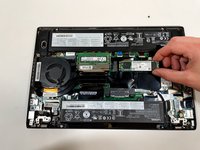
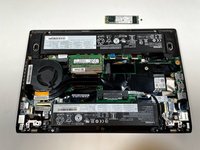
Locate the SSD slot between the large battery and fan.
-
Remove the screw securing the SSD using a Phillips #000 screwdriver.
-
-


To reassemble your device, follow these instructions in reverse order.
Cancel: I did not complete this guide.
4 other people completed this guide.

Team

Illinois Wesleyan University, Team S1-G3, Bullock Spring 2021 Member of Illinois Wesleyan University, Team S1-G3, Bullock Spring 2021
IWU-BULLOCK-S21S1G3
4 Members
72 Guides authored
