
Lenovo ThinkPad T470 External Battery Replacement

Kristen Gismondi and one other contributor
Last updated on Feb 3, 2022
Views: 5.8K
View statistics:
- Past 24 Hours:
- 7
- Past 7 Days:
- 38
- Past 30 Days:
- 141
- All Time:
- 5,848
Comments: 1
1 comment on steps.
Completed: 4 5
4 people have marked this guide "completed." Will you be next?
5 people have marked this guide "completed." Including you — great job!
Favorites: 0 1
No one has favorited (and subscribed to) this guide. Will you be the first?
1 person has favorited (and subscribed to) this guide — and that's you!
Introduction
Go to step 1 ↓This guide will show you how to replace the external battery on your Lenovo ThinkPad T470.
A healthy laptop battery will keep your laptop powered on, even when your device is unplugged from an external power source.
If your laptop no longer holds a charge, or loses its charge very quickly, you most likely have a dead or failing battery which may require replacement. Depending on the cause of your faulty battery, you may be able to resolve the issue using this list of troubleshooting symptoms and solutions from Lenovo’s support forum.
For your safety, discharge your battery below 25% before disassembling your device. This reduces the risk of a dangerous thermal event if the battery is accidentally damaged during the repair. If your battery is swollen, take appropriate precautions.
Make sure to disable the internal battery, power down your device, and disconnect from any external power sources before you begin.
What you need

-
-
-
Place the laptop so that the bottom is facing upwards.
-
Slide the latch on the left side of the battery to the left until it clicks in place.
 Ask FixBot
-
-
-
-
Slide the latch on the right side of the battery to the right and hold it in place with your thumb.
-
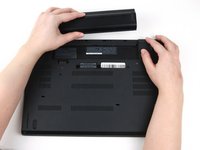
Use your other hand to slide the battery towards the back of the laptop.
-
Lift the battery up and away from the laptop.
-
-


To reassemble your device, follow these instructions in reverse order.
Take your e-waste to an R2 or e-Stewards certified recycler.
For optimal performance, after completing this guide, calibrate your newly installed battery.
Cancel: I did not complete this guide.
4 other people completed this guide.


