Introduction
The wireless chip allows users of the Lenovo T460p to connect to Wifi and Bluetooth devices. Unlike some devices where the chip is part of the motherboard and not easily removed, this particular laptop allows for easy replacement. If your drivers are up to date and you are sure this is the reason you have wireless connectivity issues, this is the repair guide for you!
What you need
-
-
-
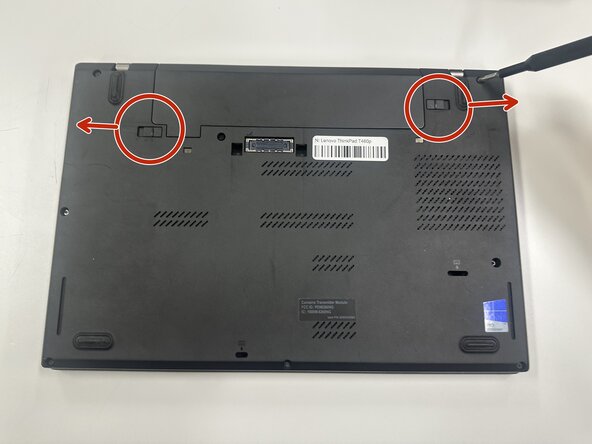
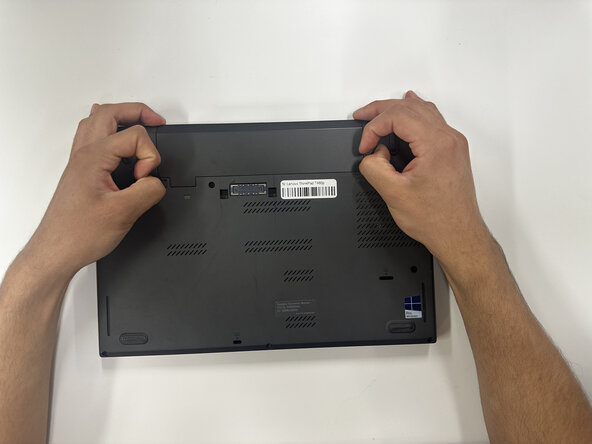
Slide each of the two battery locking tabs toward the closest edge.
-
Remove the battery.
 Ask FixBot
-
-
-
-
-
-
Loosen the eight 4 mm-long captive Phillips screws securing the lower case.
-
Insert an opening pick into the seam between the lower case and chassis.
-
Pry around the entire perimeter of the laptop until the lower case fully releases.
-
Remove the lower case.
-
-
-
Use the pointed end of a spudger to lift and disconnect the two coaxial connectors.
-
Remove the 4 mm-long screw securing the card.
-
Remove the module.
-
-



To reassemble your device, follow the above steps in reverse order.
Take your e-waste to an R2 or e-Stewards certified recycler.
Repair didn’t go as planned? Try some basic troubleshooting or ask our Answers community for help.

Team

Purdue University Northwest, Team 8-18, Dieterle Spring 2026 Member of Purdue University Northwest, Team 8-18, Dieterle Spring 2026
PNW-DIETERLE-S26S8G18
4 Members
60 Guides authored
