Introduction
This guide covers step by step how to replace the random access memory (RAM) sticks on the Lenovo T460p; this computer is equipped with two slots normally. RAM is the short-term memory of the computer while it is running, and it is strongly correlated to the responsiveness of the system. As computer programs evolve to be more demanding, upgraded RAM can allow older devices to efficiently run newer software. If your computer spends abnormally long amounts of time loading, this replacement guide may be for you!
What you need
-
-
-
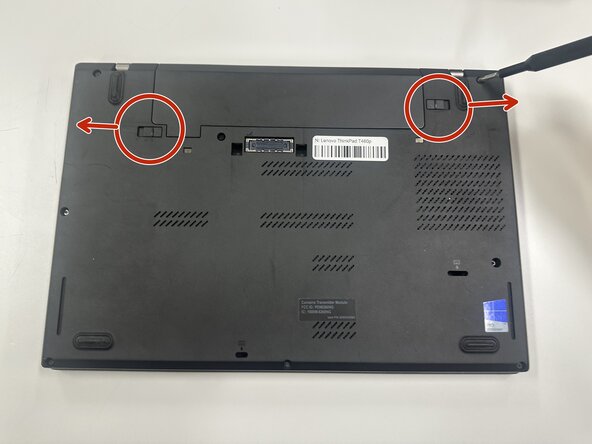
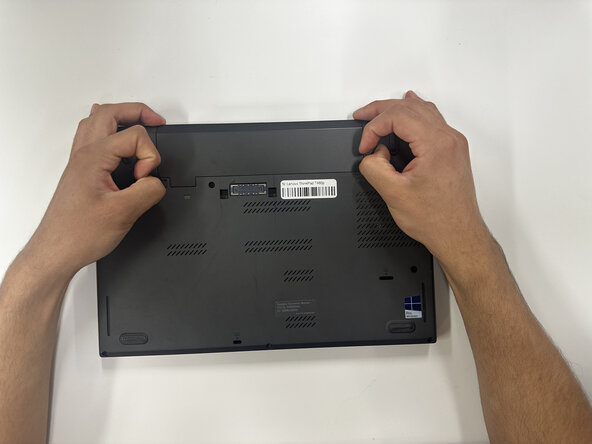
Slide each of the two battery locking tabs toward the closest edge.
-
Remove the battery.
 Ask FixBot
-
-
-
-
-
-
Loosen the eight 4 mm-long captive Phillips screws securing the lower case.
-
Insert an opening pick into the seam between the lower case and chassis.
-
Pry around the entire perimeter of the laptop until the lower case fully releases.
-
Remove the lower case.
-
-
-
Two clips secure each RAM module in place, one on each side. Using your fingers, spread the clips away from the RAM module.
-
Remove the RAM module(s).
-
-



To reassemble your device, follow the above steps in reverse order.
Take your e-waste to an R2 or e-Stewards certified recycler.
Repair didn’t go as planned? Try some basic troubleshooting or ask our Answers community for help.

Team

Purdue University Northwest, Team 8-18, Dieterle Spring 2026 Member of Purdue University Northwest, Team 8-18, Dieterle Spring 2026
PNW-DIETERLE-S26S8G18
4 Members
60 Guides authored
