Introduction
There is a battery in addition to the external battery called the complementary metal-oxide semiconductor (CMOS) battery. The CMOS battery is responsible for keeping track of BIOS data, in addition to time, date, and some user specified settings. It is crucial that this battery functions when the computers main power source is disengaged or it can “forget” these things. Incorrect date and time, long boot times and BIOS issues are all symptoms of this component failing.
What you need
-
-
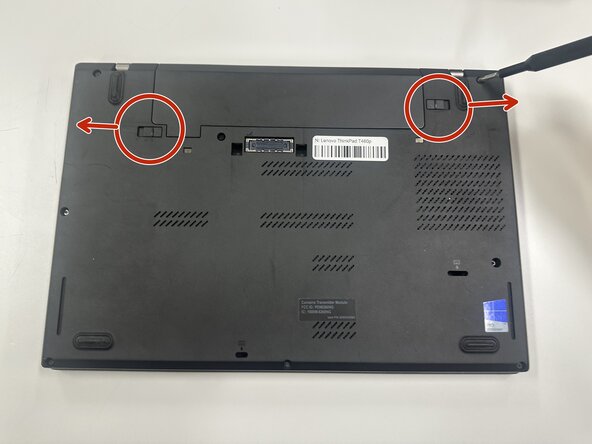
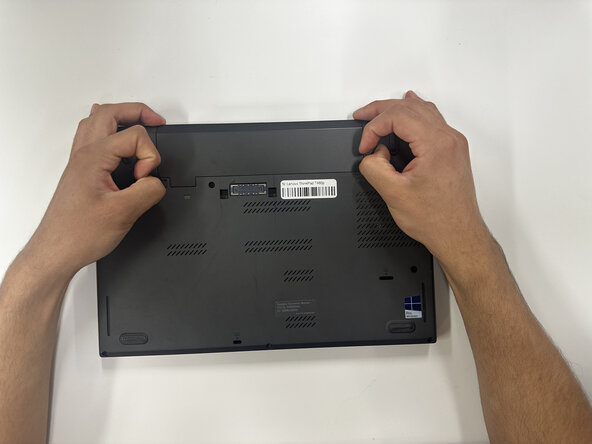
Slide each of the two battery locking tabs toward the closest edge.
-
Remove the battery.
 Ask FixBot
-
-
-
-
Loosen the eight 4 mm-long captive Phillips screws securing the lower case.
-
Insert an opening pick into the seam between the lower case and chassis.
-
Pry around the entire perimeter of the laptop until the lower case fully releases.
-
Remove the lower case.
-
-
-
Disconnect the CMOS battery cable pictured; it should pull out of its respective socket with light tension.
-
Remove the CMOS battery.
-



To reassemble your device, follow the above steps in reverse order.
Take your e-waste to an R2 or e-Stewards certified recycler.
Repair didn’t go as planned? Try some basic troubleshooting or ask our Answers community for help.

Team

Purdue University Northwest, Team 8-18, Dieterle Spring 2026 Member of Purdue University Northwest, Team 8-18, Dieterle Spring 2026
PNW-DIETERLE-S26S8G18
4 Members
5 Guides authored
