
Lenovo ThinkPad T460p Battery Replacement

Marcos Silva and 2 other contributors
Last updated on Jun 12, 2026
Views: 280
View statistics:
- Past 24 Hours:
- 2
- Past 7 Days:
- 20
- Past 30 Days:
- 89
- All Time:
- 280
Comments: 0
No one has left comments on this guide. Will you be first?
Go to guide commentsCompleted: 0 1
No one has marked this guide "completed." Will you be the first?
1 person has marked this guide "completed." It's you — great job!
Favorites: 0 1
No one has favorited (and subscribed to) this guide. Will you be the first?
1 person has favorited (and subscribed to) this guide — and that's you!
Introduction
Go to step 1 ↓The Lenovo T460p has an external battery that supplies power during normal use, as well as an internal CMOS battery that allows the computer to store data when the computer is not powered on. This repair guide shows step by step how to replace the external main battery, which when defective makes battery life extremely short or nonexistent. Any battery with visible damage should additionally be replaced, regardless of its performance.
-
-
-
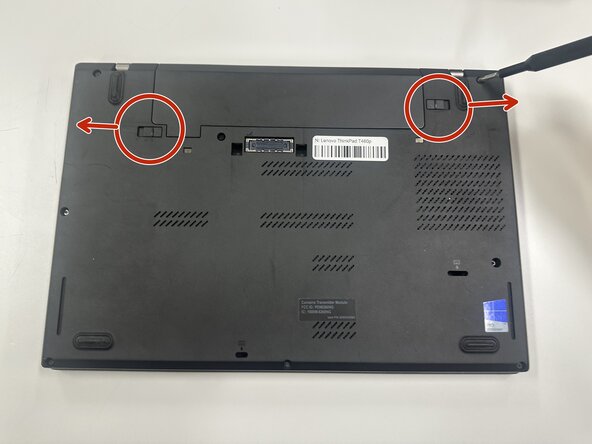
Slide each of the two battery locking tabs toward the closest edge.
-
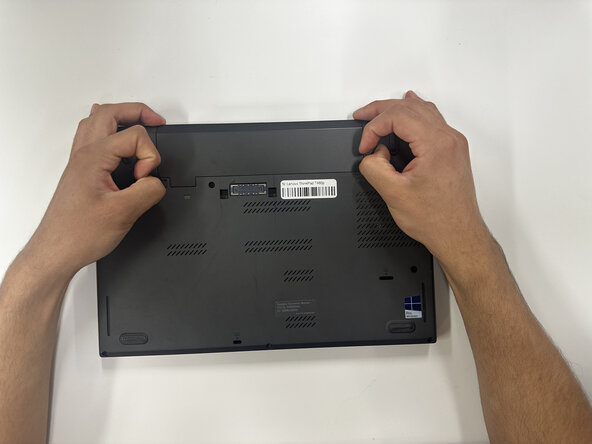
Remove the battery.
 Ask FixBot
-
-
-



To reassemble your device, follow the above steps in reverse order.
For optimal performance, after completing this guide, calibrate your newly installed battery.
Take your e-waste to an R2 or e-Stewards certified recycler.
Repair didn’t go as planned? Try some basic troubleshooting or ask our Answers community for help.

Team

Purdue University Northwest, Team 8-18, Dieterle Spring 2026 Member of Purdue University Northwest, Team 8-18, Dieterle Spring 2026
PNW-DIETERLE-S26S8G18
4 Members
60 Guides authored
