
Lenovo ThinkPad T431S Fan Replacement

Joe Minnich and 4 other contributors
Last updated on Jun 3, 2020
Views: 764
View statistics:
- Past 24 Hours:
- 1
- Past 7 Days:
- 9
- Past 30 Days:
- 54
- All Time:
- 764
Comments: 1
1 guide comment.
Go to guide commentsCompleted: 2 3
2 people have marked this guide "completed." Will you be next?
3 people have marked this guide "completed." Including you — great job!
Favorites: 0 1
No one has favorited (and subscribed to) this guide. Will you be the first?
1 person has favorited (and subscribed to) this guide — and that's you!
Introduction
Go to step 1 ↓This guide will show you how to locate and replace the Lenovo T431s fan. The cooling fan is what keeps your processing unit cool so the elements of your computer don’t overheat. If you are experiencing malfunction, overheat warning messages, or hot components, you might need to replace your cooling fan.
What you need
Tools


-
-
-
Use a Phillips #1 screwdriver bit to remove eight 5.0 mm screws from the back panel.
-
Carefully pry off the back panel using the opening tool.
 Ask FixBot
-
-
-
Use a Phillips #1 screwdriver bit and remove the four 3.0 mm screws from the heatsink.
-
-
-
-
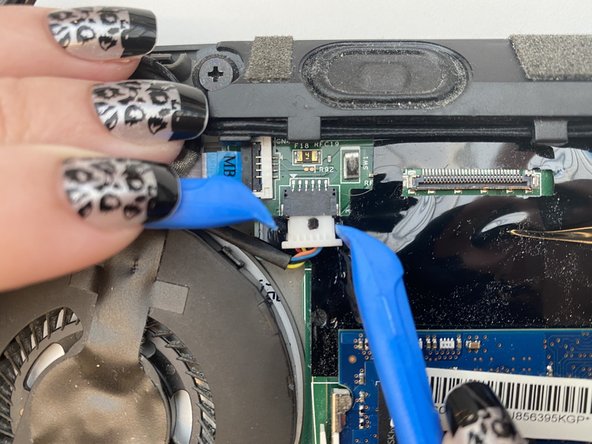
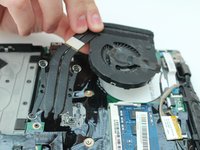
Disconnect the cable attached to the fan, pulling the connector straight down.
-
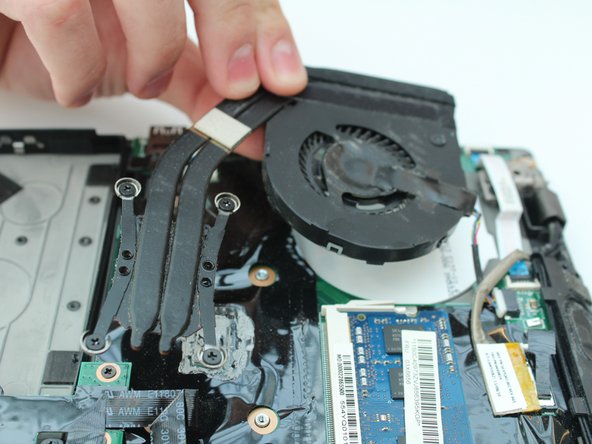
Lift and remove the fan.
-
-


To reassemble your device, follow these instructions in reverse order.
Cancel: I did not complete this guide.
2 other people completed this guide.

Team

Embry-Riddle Aeronautical University, Team S14-G2, Lamothe Spring 2020 Member of Embry-Riddle Aeronautical University, Team S14-G2, Lamothe Spring 2020
ERAU-LAMOTHE-S20S14G2
4 Members
60 Guides authored
