Introduction
This guide will show you how to locate and replace the Lenovo T431s battery. The battery provides proper power to the computer for its functions. Replacing your battery can be beneficial to improve computer usage and lifetime. If your laptop dies frequently or doesn’t power on, then you should consider replacing your battery.
What you need
-
-
-
Use a Phillips #1 screwdriver bit to remove the eight 5mm screws from the back panel.
-
Once the screws are loose, use the three opening tools to loosen and remove the back panel.
 Ask FixBot
-
-
-
-
Carefully unplug the battery cable from the connector on the motherboard, using your fingers to pull the cable straight out of the port.
-
-
-
Unscrew the five 4mm screws that are holding the battery secure with a Phillips #1 screwdriver.
-
Remove the Li-polymer battery by lifting it directly out of the device.
-
-


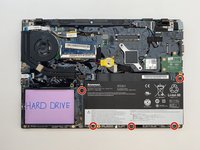
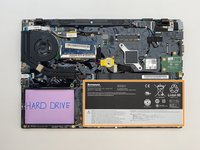
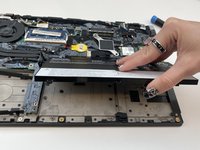
To reassemble your device, follow these instructions in reverse order.
Cancel: I did not complete this guide.
3 other people completed this guide.

Team

Embry-Riddle Aeronautical University, Team S14-G2, Lamothe Spring 2020 Member of Embry-Riddle Aeronautical University, Team S14-G2, Lamothe Spring 2020
ERAU-LAMOTHE-S20S14G2
4 Members
59 Guides authored
