Introduction
This guide explains how to replace the RAM stick in your Lenovo ThinkPad T430s. The RAM stick stores information before it heads to the central processing unit (CPU), which sorts it.
If your ThinkPad runs slowly, uses most of the memory space, or doesn’t allow you to run multiple programs at once, you may need to replace your RAM stick.
What you need
-
-
-
Flip your ThinkPad on its back.
-
In the bottom left corner of your ThinkPad, slide the lever to the left. Hold the lever there.
-
Use your other hand to lift the battery up by prying the notch to the left of the lever.
-
Tilt the battery up and remove it from the ThinkPad.
 Ask FixBot
-
-
-
-
-
-
With the Phillips #0 screwdriver, loosen the two 30 mm screws holding down the RAM stick plate.
-
Pry up the plate and set it aside.
-
-
-
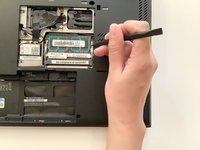
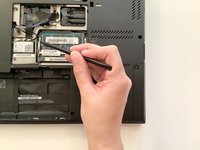
Use the pointy end of the spudger to bend the bars holding the RAM stick in place.
-
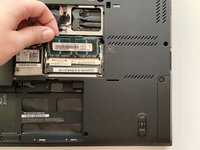
Lift the RAM stick up and out of the stick holder.
-
-


To reassemble your device, follow these instructions in reverse order.
Cancel: I did not complete this guide.
2 other people completed this guide.

Team

Western Carolina University, Team S1-G1, Virtue Fall 2020 Member of Western Carolina University, Team S1-G1, Virtue Fall 2020
WCU-VIRTUE-F20S1G1
1 Member
60 Guides authored
