Introduction
The LCD screen and its peripherals are very sensitive and mishandling may result in a missing dot, line, or pixel problems. To ensure that no damage is done to the LCD screen:
- Don't apply pressure to the LCD
- Always hold the LCD from the right and left edges
- Don't apply any pressure to the lower part of the LCD
What you need
-
-
-
Use a #0 Phillips head screwdriver to remove the two 3mm screws that hold the screen bezel in place.
 Ask FixBot
-
-
-
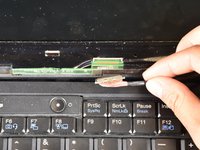
Using the plastic opening tool, gently pry off the plastic LCD screen frame around the entire perimeter.
-
-
-




To reassemble your device, follow these instructions in reverse order.
Cancel: I did not complete this guide.
7 other people completed this guide.

Team

Cal Poly, Team 6-18, Maness Spring 2015 Member of Cal Poly, Team 6-18, Maness Spring 2015
CPSU-MANESS-S15S6G18
4 Members
60 Guides authored
