
Lenovo ThinkPad L490 Battery Replacement

Last updated on May 16, 2025
Views: 1.8K
View statistics:
- Past 24 Hours:
- 3
- Past 7 Days:
- 28
- Past 30 Days:
- 141
- All Time:
- 1,787
Comments: 0
No one has left comments on this guide. Will you be first?
Go to guide commentsCompleted: 0 1
No one has marked this guide "completed." Will you be the first?
1 person has marked this guide "completed." It's you — great job!
Favorites: 0 1
No one has favorited (and subscribed to) this guide. Will you be the first?
1 person has favorited (and subscribed to) this guide — and that's you!
Introduction
Go to step 1 ↓The internal battery of a laptop supplies power to the device when it is not receiving power from an outlet. When the battery begins to drain quickly or is damaged you will want to replace the battery of your Lenovo ThinkPad L490.
This guide will walk you through the steps to replacing the internal laptop battery of your Lenovo ThinkPad L490.
For this guide you will need the Spudger and the Phillips #0 screwdriver. This guide does not have any difficult steps other than disconnecting the connectors carefully.
What you need
Fix Kit
This kit contains all the parts and tools needed to complete this guide.

Parts


Tools
-
-
Spudger4.9


-
-
-
Lay the laptop down with the lower case facing up.
-
Use a Phillips #00 screwdriver to remove eight 3 mm screws that secure the lower case.
 Ask FixBot
-
-
-
-
-
-
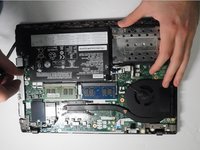
Grip the battery connector and pull it directly out of its motherboard socket.
-
-
-
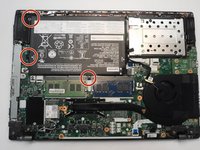
Use a Phillips #0 screwdriver to remove the three m2 x 2.5 mm screws that secure the battery.
-
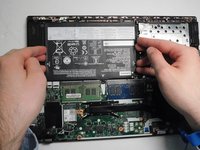
Lift the battery up and out of the chassis.
-
-


To reassemble your device, follow the above steps in reverse order.
For optimal performance, after completing this guide, calibrate your newly installed battery.
Take your e-waste to an R2 or e-Stewards certified recycler.

Team

Gateway, Team 8-4, Gonzalez Fall 2024 Member of Gateway, Team 8-4, Gonzalez Fall 2024
GCC-GONZALEZ-F24S8G4
4 Members
48 Guides authored
