
Lenovo ThinkPad L460 LCD Assembly Replacement

Jacob Karl and 3 other contributors
Last updated on Dec 31, 2025
Views: 474
View statistics:
- Past 24 Hours:
- 2
- Past 7 Days:
- 24
- Past 30 Days:
- 95
- All Time:
- 474
Comments: 0
No one has left comments on this guide. Will you be first?
Go to guide commentsCompleted: 0 1
No one has marked this guide "completed." Will you be the first?
1 person has marked this guide "completed." It's you — great job!
Favorites: 0 1
No one has favorited (and subscribed to) this guide. Will you be the first?
1 person has favorited (and subscribed to) this guide — and that's you!
Introduction
Go to step 1 ↓A cracked or otherwise visibly broken screen will require a complete replacement of the LCD assembly. This guide will instruct you how to safely remove and replace the screen assembly on the Lenovo ThinkPad L460.
IMPORTANT:
Always ground yourself when working with sensitive electronics. Periodically touch a large metal object such as a table or chair while working or use an ESD wrist strap connected to a large metal object.
Before you begin, turn off your laptop and disconnect from the charger or any peripherals.
What you need
Tools
-
-
Spudger4.9


-
-
-
Shut down your Lenovo ThinkPad L460 completely.
-
Disconnect the AC power adapter.
-
Disconnect all connected cables and devices.
 Ask FixBot
-
-
-
Use your two thumbs to push the two locking latches to the left and the right of the battery to the unlocked position.
-
While holding the latches open, slide the battery out of the connector to remove it.
-
-
-
-
-
Use a Phillips #1 screwdriver to loosen the 8 captive screws on the back cover of the laptop.
-
Remove the SIM tray from the side of the laptop.
-
-
-
Use an opening tool to gently pry along the edges of the cover, releasing all the plastic clips of the laptop.
-
Carefully pull up and remove the back cover from the laptop.
-
-
-
-
-
Use a Phillips #1 screwdriver to remove the four 6 mm screws and a Phillips #0 screwdriver to remove the two 5 mm screws from the hinges at the corners of the laptop.
-
-
-
-
Flip the black plastic cover up to reveal the Wi-Fi card.
-
Slide a thin, ESD-safe pry tool or angled tweezers under the metal neck of the coaxial cable connectors (as close to the head as possible) and lift straight up from the Wi-Fi card.
-
Use a spudger or a clean fingernail to flip up the locking flap on the display connector—this is the unlocked position.
-
Use tweezers or your fingers to gently pull the cable out of its socket.
-
-
-
Flip up the two hinged plates on the sides of the laptop.
-
Remove the LCD assembly from the laptop.
-
-


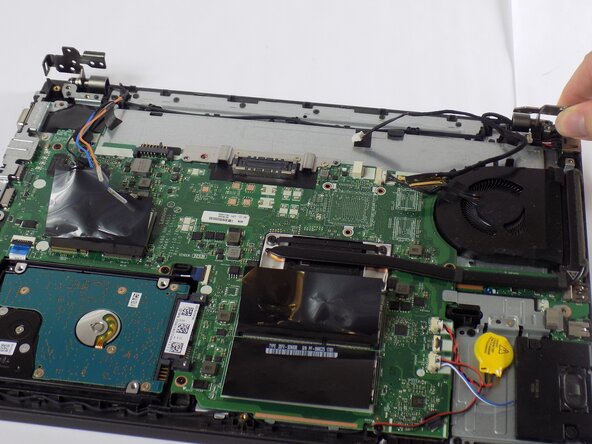
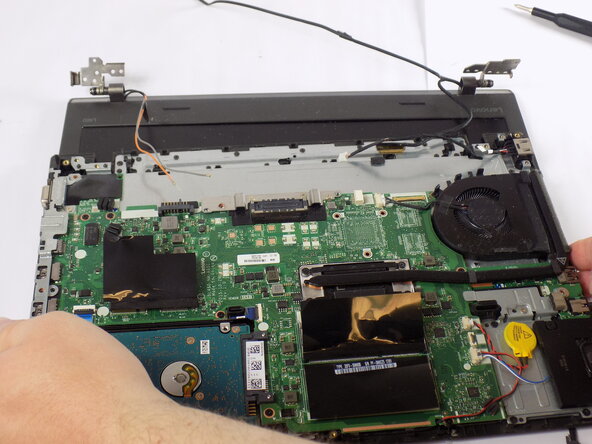


To reassemble your device, follow these instructions in reverse order. Take your e-waste to an R2 or e-Stewards certified recycler.

Team

UMass Dartmouth, Team 2-4, Bowman Fall 2025 Member of UMass Dartmouth, Team 2-4, Bowman Fall 2025
UMASSD-BOWMAN-F25S2G4
4 Members
72 Guides authored
