Free Shipping on Domestic Orders $75+

Lenovo ThinkPad Edge E520 CD Disk Drive Replacement

What you need

    1. Lenovo ThinkPad Edge E520 CD Disk Drive Replacement, Battery: step 1, image 1 of 1
      • Power off and unplug the computer before the start of these steps.

      • Close the laptop lid.

      Ask FixBot

      Add Comment

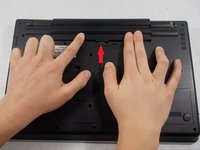
    2. Lenovo ThinkPad Edge E520 CD Disk Drive Replacement: step 2, image 1 of 2 Lenovo ThinkPad Edge E520 CD Disk Drive Replacement: step 2, image 2 of 2
      • Flip the computer so that the back is facing upwards.

      • Locate the switch used to release the battery.

      • The switch should be located towards the hinge of the laptop near the battery pack and have a lock icon associated with it.

      Ask FixBot

      Add Comment

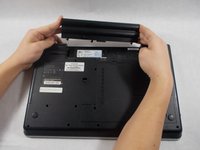
    3. Lenovo ThinkPad Edge E520 CD Disk Drive Replacement: step 3, image 1 of 2 Lenovo ThinkPad Edge E520 CD Disk Drive Replacement: step 3, image 2 of 2
      • Slide the switch towards the unlocked lock icon.

      • While holding it in the unlocked position, slide the battery towards the hinge.

      • Fully separate the battery pack from the back of the laptop.

      Ask FixBot

      Add Comment

    1. Lenovo ThinkPad Edge E520 CD Disk Drive Replacement, Back Plate: step 4, image 1 of 2 Lenovo ThinkPad Edge E520 CD Disk Drive Replacement, Back Plate: step 4, image 2 of 2
      • Flip over the laptop and position it with the battery being furthest away from you.

      • Remove the four screws on the edges of the T-Shaped plate with a Phillips #0 screwdriver.

      • Remove the T-Shaped plate from the back of the computer. It should come off easily if all four aforementioned screws are removed.

      • Screw length 6.35 mm, head 3.175 mm

      Ask FixBot

      Add Comment

    1. Lenovo ThinkPad Edge E520 CD Disk Drive Replacement, Keyboard: step 5, image 1 of 1
      • Remove the battery from the back of the device

      • Unscrew the two 3.175 mm diameter and 6.35 mm length screws with keyboard symbols pointing at them using a Phillips head screwdriver.

      Ask FixBot

      Add Comment

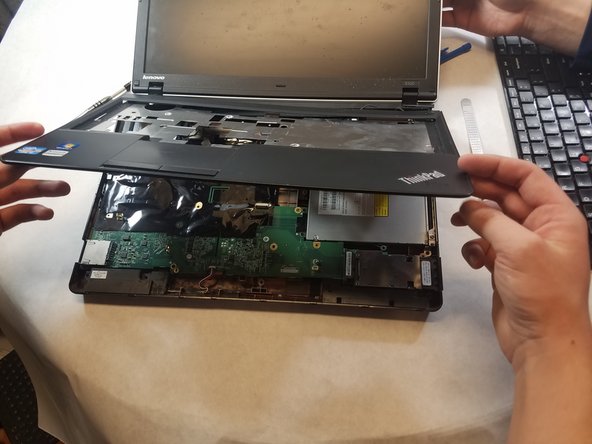
    2. Lenovo ThinkPad Edge E520 CD Disk Drive Replacement: step 6, image 1 of 3 Lenovo ThinkPad Edge E520 CD Disk Drive Replacement: step 6, image 2 of 3 Lenovo ThinkPad Edge E520 CD Disk Drive Replacement: step 6, image 3 of 3
      • Turn the laptop back over so that the keyboard is facing you.

      • Use your hands to separate the keyboard from the laptop

      Ask FixBot

      Add Comment

    1. Lenovo ThinkPad Edge E520 CD Disk Drive Replacement, Front Compartment Case: step 7, image 1 of 1
      • Remove all remaining screws on the back of the device.

      • Screw length 6.35 mm, head 3.175 mm Screws behind battery length 3.175 mm, head 3.175 mm

      Ask FixBot

      Add Comment

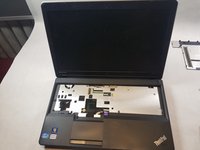
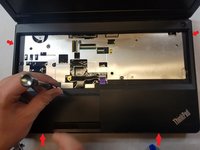
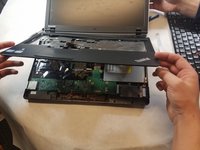
    2. Lenovo ThinkPad Edge E520 CD Disk Drive Replacement: step 8, image 1 of 3 Lenovo ThinkPad Edge E520 CD Disk Drive Replacement: step 8, image 2 of 3 Lenovo ThinkPad Edge E520 CD Disk Drive Replacement: step 8, image 3 of 3
      • Flip device back over and open the screen.

      • Insert the prying tool on one edge of the case and follow along all four edges until the case frees up.

      • Remove the case.

      Ask FixBot

      Add Comment

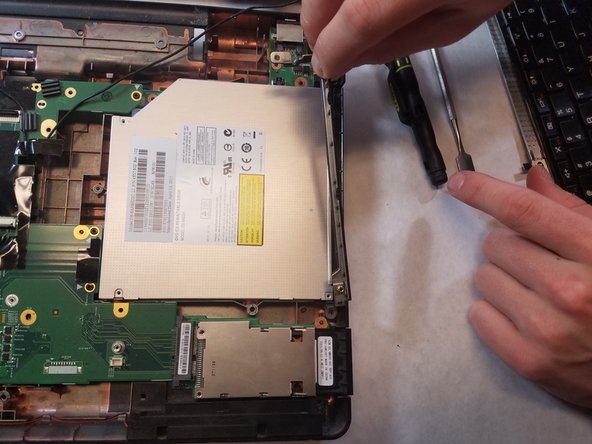
    1. Lenovo ThinkPad Edge E520 CD Disk Drive Replacement, CD Disk Drive: step 9, image 1 of 2 Lenovo ThinkPad Edge E520 CD Disk Drive Replacement, CD Disk Drive: step 9, image 2 of 2
      • The silver block contains two screws.

      • Unscrew the two screws to remove the clamp that holds the disk drive in place.

      • Screw length 6.35 mm, head 3.175 mm

      Ask FixBot

      Add Comment

      • Remove the screws holding the disk drive in place and then slide outwards to remove

      • Screw length 6.35 mm, head 3.175 mm

      Ask FixBot

      Add Comment

Conclusion

To reassemble your device, follow these instructions in reverse order.

Cancel: I did not complete this guide.

One other person completed this guide.

Andrew Martin

Member since: 03/01/18

244 Reputation

2 Guides authored

Team

0 Guide Comments

Add Comment

View Statistics:

Past 24 Hours: 0

Past 7 Days: 4

Past 30 Days: 30

All Time: 719