Introduction
This repair guide will help to replace the Lenovo Thinkpad Edge E520. This guide will be useful if your device does not power up correctly or has a short battery life.
-
-
-
-
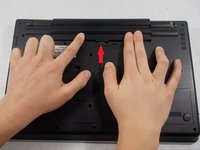
Flip the computer so that the back is facing upwards.
-
Locate the switch used to release the battery.
-
-
-
Slide the switch towards the unlocked lock icon.
-
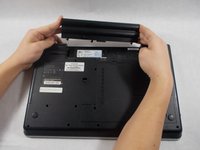
While holding it in the unlocked position, slide the battery towards the hinge.
-
Fully separate the battery pack from the back of the laptop.
-

 Ask FixBot


To reassemble your device, follow these instructions in reverse order.
Cancel: I did not complete this guide.
2 other people completed this guide.

Team

UMass Dartmouth, Team S1-G2, Simcock Spring 2018 Member of UMass Dartmouth, Team S1-G2, Simcock Spring 2018
UMASSD-SIMCOCK-S18S1G2
4 Members
96 Guides authored
1 Guide Comment
This guide by Holly made everything so easy. Well done, Holly!
