Introduction
This guide will show you how to replace the hard drive in your Lenovo ThinkPad E570 laptop. Is your device screen suddenly taking you to a blue screen with the message "Your PC ran into a problem and needs to restart?" Do other frequent error messages happen during normal operations? Do you have irregular system crashes and disk errors? This could be an indication of a faulty hard drive that needs to be replaced. Replacing the hard drive will ensure your device doesn't have frequent error messages and disappearing files and folders.
Power down your laptop and disconnect from any external power sources before beginning this guide. Also, be sure to back up the data from your device.
What you need
-
-
-
-
Unscrew two captive 5 mm screws from the back panel of the laptop using a Phillips #00 screwdriver.
-
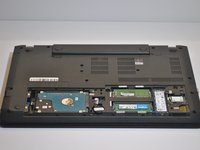
Carefully remove the back panel.
-
-
-
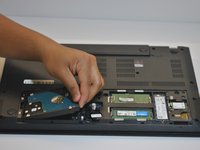
Carefully slide the hard drive to the left.
-
Remove the hard drive by lifting it up and out of the laptop.
-

 Ask FixBot



To reassemble your device, follow these instructions in reverse order.
Cancel: I did not complete this guide.
One other person completed this guide.

Team

Western Carolina University, Team 1-1, Virtue Fall 2021 Member of Western Carolina University, Team 1-1, Virtue Fall 2021
WCU-VIRTUE-F21S1G1
4 Members
60 Guides authored
