Free Shipping on Domestic Orders $75+

Lenovo ThinkPad E15 Gen 3 Trackpad Replacement

What you need

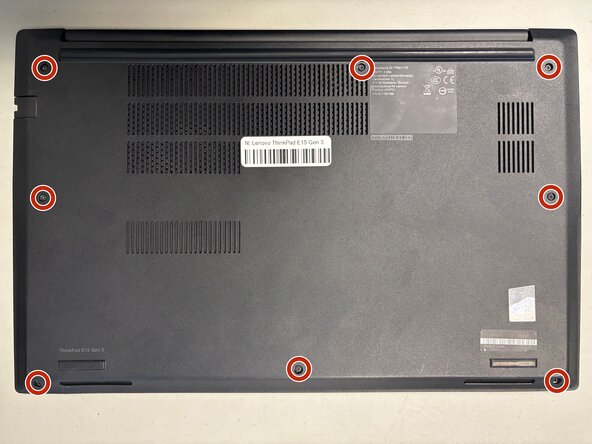
    1. Lenovo ThinkPad E15 Gen 3 Trackpad Replacement, Trackpad: step 1, image 1 of 3 Lenovo ThinkPad E15 Gen 3 Trackpad Replacement, Trackpad: step 1, image 2 of 3 Lenovo ThinkPad E15 Gen 3 Trackpad Replacement, Trackpad: step 1, image 3 of 3
      • Loosen the eight Phillips #1 captive screws using a Phillips #1 screwdriver.

      • Slide the opening pick between the upper case and the bottom cover.

      • Slide the pick around the perimeter of the case to disconnect the clips while gently pulling upwards with your free hand.

      • Lift the case upwards.

      Ask FixBot

      Add Comment

    2. Lenovo ThinkPad E15 Gen 3 Trackpad Replacement: step 2, image 1 of 1
      • Loosen the 1 5.6mm Phillips #1 screw on the I/O board with a Phillips #1 screwdriver.

      • Loosen the three 6.5mm Phillips #1 screws on the hinge with a Phillips #1 screwdriver.

      Ask FixBot

      Add Comment

    3. Lenovo ThinkPad E15 Gen 3 Trackpad Replacement: step 3, image 1 of 2 Lenovo ThinkPad E15 Gen 3 Trackpad Replacement: step 3, image 2 of 2
      • Lift the cable clasp using your fingertip or a spudger.

      • Pull the cable out from the socket.

      Ask FixBot

      Add Comment

    4. Lenovo ThinkPad E15 Gen 3 Trackpad Replacement: step 4, image 1 of 3 Lenovo ThinkPad E15 Gen 3 Trackpad Replacement: step 4, image 2 of 3 Lenovo ThinkPad E15 Gen 3 Trackpad Replacement: step 4, image 3 of 3
      • Use a screwdriver to lift up the hinge.

      • Rotate the hinge by 180°.

      Ask FixBot

      Add Comment

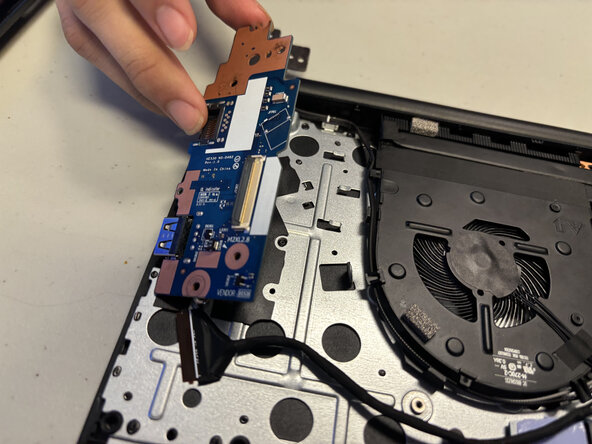
    5. Lenovo ThinkPad E15 Gen 3 Trackpad Replacement: step 5, image 1 of 1
      • Lift the I/O board out.

      Ask FixBot

      Add Comment

    6. Lenovo ThinkPad E15 Gen 3 Trackpad Replacement: step 6, image 1 of 2 Lenovo ThinkPad E15 Gen 3 Trackpad Replacement: step 6, image 2 of 2
      • Remove the one 3.5mm screw using a Phillips #1 screwdriver.

      • Pry off the two wires that connect to the WiFi card.

      Ask FixBot

      Add Comment

    7. Lenovo ThinkPad E15 Gen 3 Trackpad Replacement: step 7, image 1 of 2 Lenovo ThinkPad E15 Gen 3 Trackpad Replacement: step 7, image 2 of 2
      • Lift and pull out the WiFi card.

      Ask FixBot

      Add Comment

    8. Lenovo ThinkPad E15 Gen 3 Trackpad Replacement: step 8, image 1 of 1
      • Lift the WiFi wires directly upwards using both hands.

      Ask FixBot

      Add Comment

    9. Lenovo ThinkPad E15 Gen 3 Trackpad Replacement: step 9, image 1 of 1
      • Remove the black cable.

      Ask FixBot

      Add Comment

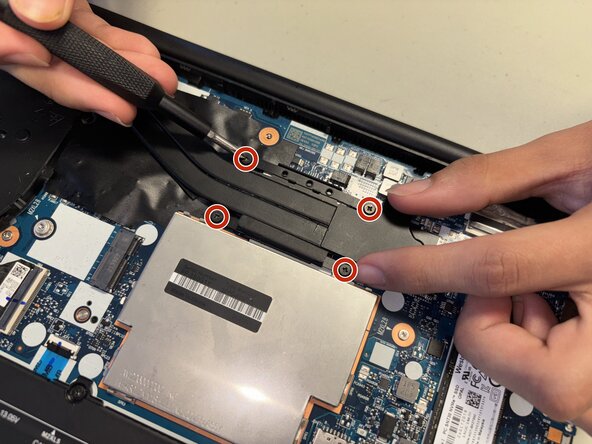
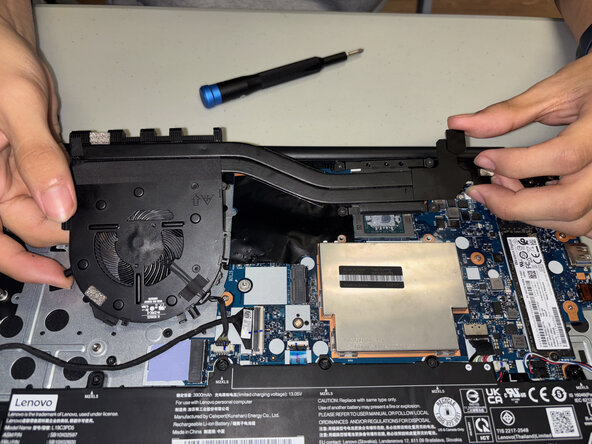
    10. Lenovo ThinkPad E15 Gen 3 Trackpad Replacement: step 10, image 1 of 3 Lenovo ThinkPad E15 Gen 3 Trackpad Replacement: step 10, image 2 of 3 Lenovo ThinkPad E15 Gen 3 Trackpad Replacement: step 10, image 3 of 3
      • Loosen and remove all screws securing the fan and heatsinks assembly using a Phillips #1 screwdriver.

      • Lift the heatsink and fan assembly directly upwards using both hands.

      • Place the fan assembly aside with the thermal paste facing upwards to avoid catching debris.

      Ask FixBot

      Add Comment

    11. Lenovo ThinkPad E15 Gen 3 Trackpad Replacement: step 11, image 1 of 3 Lenovo ThinkPad E15 Gen 3 Trackpad Replacement: step 11, image 2 of 3 Lenovo ThinkPad E15 Gen 3 Trackpad Replacement: step 11, image 3 of 3
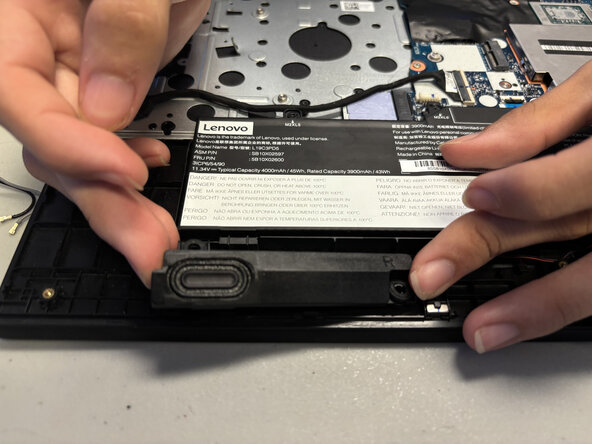
      • Extract and remove the left and right speakers.

      • Pull back the cord.

      Ask FixBot

      Add Comment

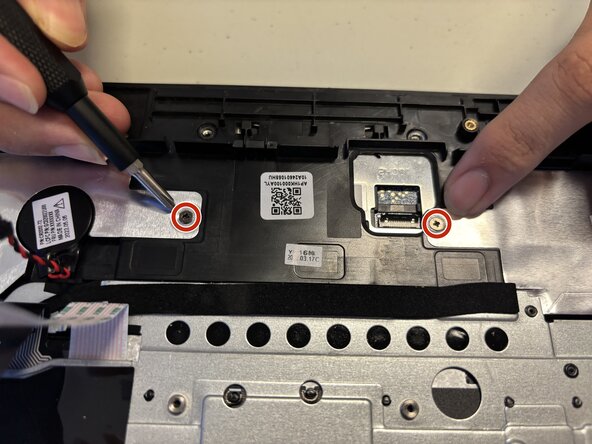
    12. Lenovo ThinkPad E15 Gen 3 Trackpad Replacement: step 12, image 1 of 3 Lenovo ThinkPad E15 Gen 3 Trackpad Replacement: step 12, image 2 of 3 Lenovo ThinkPad E15 Gen 3 Trackpad Replacement: step 12, image 3 of 3
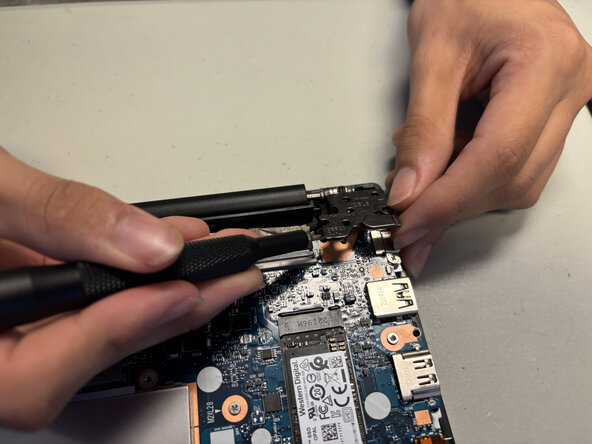
      • Remove the two black 6.5mm screws using a Phillips #1 screwdriver.

      • Lift the hinge.

      Ask FixBot

      Add Comment

    13. Lenovo ThinkPad E15 Gen 3 Trackpad Replacement: step 13, image 1 of 2 Lenovo ThinkPad E15 Gen 3 Trackpad Replacement: step 13, image 2 of 2
      • Lift the cable clasp using your fingertip or a spudger.

      • Remove the cable.

      Ask FixBot

      Add Comment

    14. Lenovo ThinkPad E15 Gen 3 Trackpad Replacement: step 14, image 1 of 2 Lenovo ThinkPad E15 Gen 3 Trackpad Replacement: step 14, image 2 of 2
      • Remove the five black 5.5mm screws using a Phillips #1 screwdriver.

      Ask FixBot

      Add Comment

    15. Lenovo ThinkPad E15 Gen 3 Trackpad Replacement: step 15, image 1 of 2 Lenovo ThinkPad E15 Gen 3 Trackpad Replacement: step 15, image 2 of 2
      • Remove the blue ribbon cord.

      • Remove the red and black twisted cable to prevent damage.

      Ask FixBot

      Add Comment

    16. Lenovo ThinkPad E15 Gen 3 Trackpad Replacement: step 16, image 1 of 3 Lenovo ThinkPad E15 Gen 3 Trackpad Replacement: step 16, image 2 of 3 Lenovo ThinkPad E15 Gen 3 Trackpad Replacement: step 16, image 3 of 3
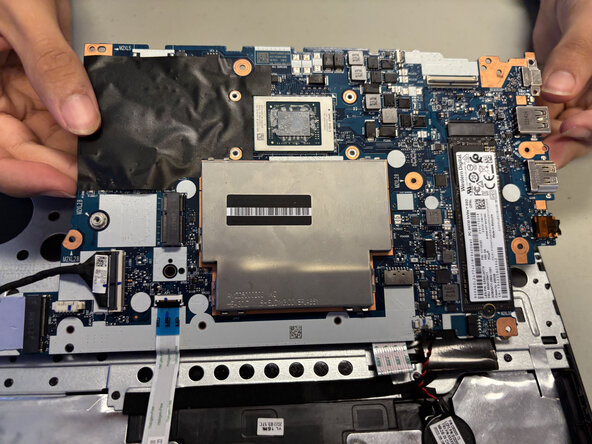
      • Lift the motherboard.

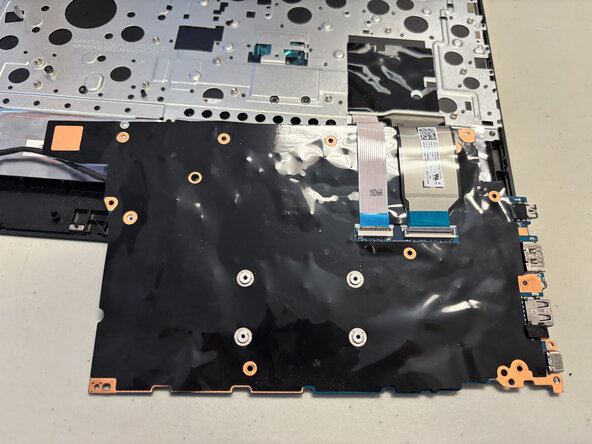
      • Flip the motherboard so that it is now upside down.

      • Remove the two ribbon cords by gently sliding them backwards.

      Ask FixBot

      Add Comment

    17. Lenovo ThinkPad E15 Gen 3 Trackpad Replacement: step 17, image 1 of 2 Lenovo ThinkPad E15 Gen 3 Trackpad Replacement: step 17, image 2 of 2
      • Remove the four black 2.3mm screws using a Phillips #1 screwdriver.

      Ask FixBot

      Add Comment

    18. Lenovo ThinkPad E15 Gen 3 Trackpad Replacement: step 18, image 1 of 2 Lenovo ThinkPad E15 Gen 3 Trackpad Replacement: step 18, image 2 of 2
      • Remove the trackpad by gently sliding it towards yourself.

      Ask FixBot

      Add Comment

Conclusion

To reassemble your device, follow these instructions in reverse order.

Cancel: I did not complete this guide.

0 Guide Comments

Add Comment

View Statistics:

Past 24 Hours: 4

Past 7 Days: 19

Past 30 Days: 54

All Time: 257