Introduction
This guide walks you through replacing a faulty or unresponsive trackpad on a Lenovo ThinkPad E14 Gen 4. You may need this repair if your trackpad is physically damaged, unresponsive, or not recognized by the system at all. This is a moderate repair requiring partial disassembly of the laptops interior.
Before beginning, power off the laptop completely and unplug it from any power source. Remove any connected peripherals. Work on a clean, flat, non-conductive surface and handle all internal components carefully to avoid static damage.
What you need
-
-
-
First start off by using your screwdriver to remove the screws from the back metal shield or cover. Loosen all seven captive screws on the back panel of the device with a Phillips #1 screwdriver.
 Ask FixBot
-
-
-
Insert an opening pick into the seam near the hinges.
-
Working from the hinges to the front, gently pry apart the back of the device from the main body.
-
-
-
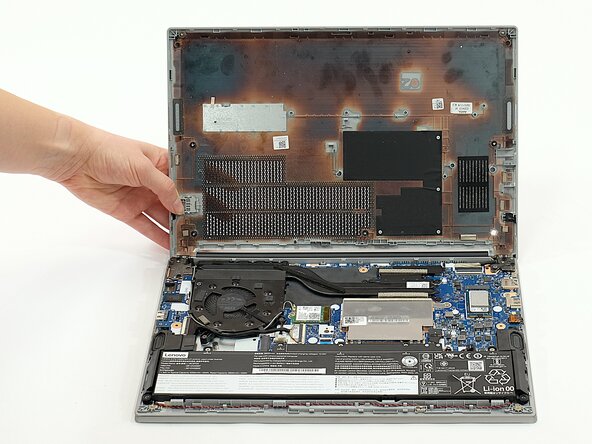
Carefully lift the loosened panel away from the laptop. The metal spudger is useful when extra prying force is needed, but a black nylon spudger or iFixit opening tool should be used whenever possible.
-
-
-
-
-
-
Remove all five 5mm screws from the battery using a Phillips #1 screwdriver.
-
-
-
Using the fabric tag, disconnect the battery cables from their port inside the device.
-
-
-
-
-
Using a screwdriver, remove the screws securing the trackpad beneath the central metal plate (directly under the battery).
-
-
-
Lift the metal plate up and away from the chassis to expose the trackpad underneath.
-
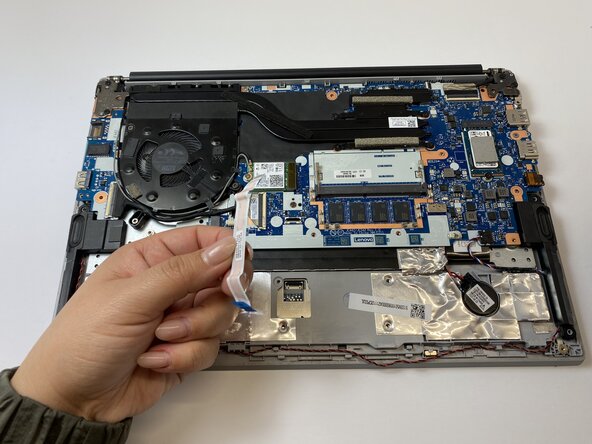
Remove the trackpad from the laptop.
-
-






To reassemble your device, follow these instructions in reverse order.

Team

Austin Community College, Team 1-1, Caverte Spring 2026 Member of Austin Community College, Team 1-1, Caverte Spring 2026
AUSTINCC-CAVERTE-S26S1G1
4 Members
35 Guides authored
