
Lenovo ThinkPad E14 Gen 4 Keyboard Replacement

Michael Mendoza and 3 other contributors
Last updated on May 20, 2026
Views: 793
View statistics:
- Past 24 Hours:
- 5
- Past 7 Days:
- 62
- Past 30 Days:
- 270
- All Time:
- 793
Comments: 0
No one has left comments on this guide. Will you be first?
Go to guide commentsCompleted: 0 1
No one has marked this guide "completed." Will you be the first?
1 person has marked this guide "completed." It's you — great job!
Favorites: 0 1
No one has favorited (and subscribed to) this guide. Will you be the first?
1 person has favorited (and subscribed to) this guide — and that's you!
Introduction
Go to step 1 ↓This guide walks you through replacing a damaged or malfunctioning keyboard on a Lenovo ThinkPad E14 Gen 4. You may need this repair if keys are sticking, unresponsive, physically broken, or if liquid damage has affected your keyboard performance.
Before beginning, power off the laptop completely and unplug it from any power source. Remove any connected peripherals. This is a moderate repair that requires removing the back panel and several internal components to access the keyboard. Work on a clean, flat, non-conductive surface and handle ribbon cables with care as they can tear easily.
What you need
Tools


-
-
-
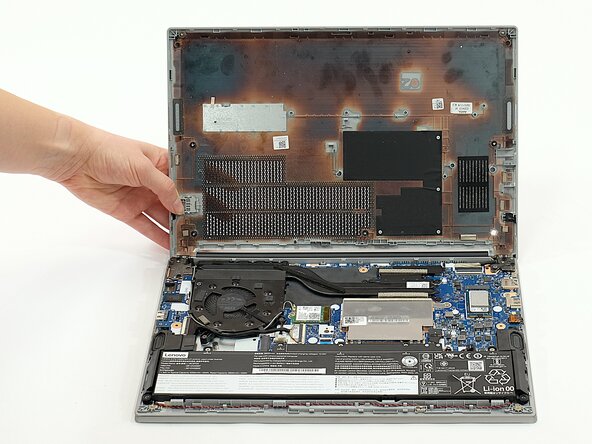
First start off by using your screwdriver to remove the screws from the back metal shield or cover. Loosen all seven captive screws on the back panel of the device with a Phillips #1 screwdriver.
 Ask FixBot
-
-
-
Insert an opening pick into the seam near the hinges.
-
Working from the hinges to the front, gently pry apart the back of the device from the main body.
-
-
-
Carefully lift the loosened panel away from the laptop. The metal spudger is useful when extra prying force is needed, but a black nylon spudger or iFixit opening tool should be used whenever possible.
-
-
-
-
-
Remove all five 5mm screws from the battery using a Phillips #1 screwdriver.
-
-
-
Using the fabric tag, disconnect the battery cables from their port inside the device.
-
-
-
-
-
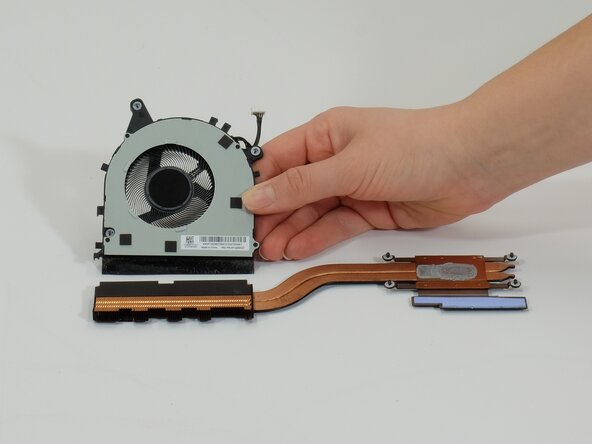
Loosen the seven screws from the fan and heat sink using a Phillips #1 screwdriver.
-
-
-
For cleaning the fan, detach it from the heatsink and flip it over.
-
Unscrew the four 3mm Phillips #1 screws and lift the back plate off to provide direct access to the fan.
-
-
-
-
-
-
Unplug the speaker wires from the motherboard using a pair of tweezers.
-
-
-
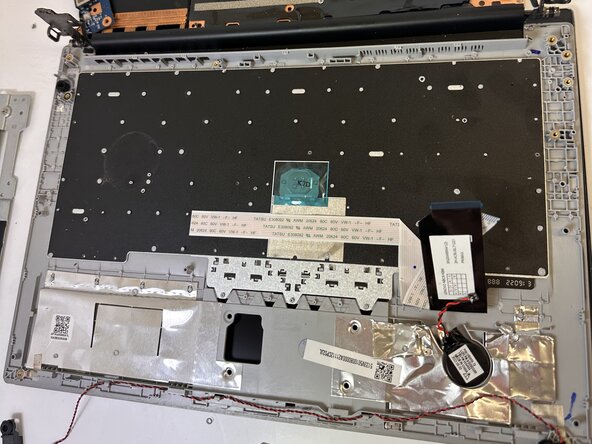
Lift the protective foil from the wires—this is to prevent the battery from making direct contact and damaging them.
-
-
-
Remove one speaker and begin unhooking the cord; you can begin with either one. Pull the wires carefully; they are woven between plastic dividers to keep them from tangling and it may be a tight fit in some spots.
-
Remove the second speaker.
-
-
-








To reassemble your device, follow these instructions in reverse order.

Team

Austin Community College, Team 1-1, Caverte Spring 2026 Member of Austin Community College, Team 1-1, Caverte Spring 2026
AUSTINCC-CAVERTE-S26S1G1
4 Members
36 Guides authored
