Free Shipping on Domestic Orders $75+

Lenovo ThinkBook 14-IIL SSD Replacement

What you need

  1. Lenovo ThinkBook 14-IIL SSD Replacement, Back Cover: step 1, image 1 of 1
    • Remove the 5.3mm screws using your Phillips #0 screwdriver.

    Ask FixBot

    Add Comment

  2. Lenovo ThinkBook 14-IIL SSD Replacement: step 2, image 1 of 3 Lenovo ThinkBook 14-IIL SSD Replacement: step 2, image 2 of 3 Lenovo ThinkBook 14-IIL SSD Replacement: step 2, image 3 of 3
    • Gently pry off the back of the laptop by inserting an opening pick into the crease on the sides and gently sliding while lifting the case up.

    Ask FixBot

    Add Comment

  3. Lenovo ThinkBook 14-IIL SSD Replacement: step 3, image 1 of 1
    • Unplug the battery from the laptop carefully as to not damage the plug.

    Ask FixBot

    Add Comment

  4. Lenovo ThinkBook 14-IIL SSD Replacement, SSD: step 4, image 1 of 1
    • Remove the 3.8mm screw holding the SSD in place using a Phillips #0 screwdriver.

    • It will lift up on its own.

    Ask FixBot

    Add Comment

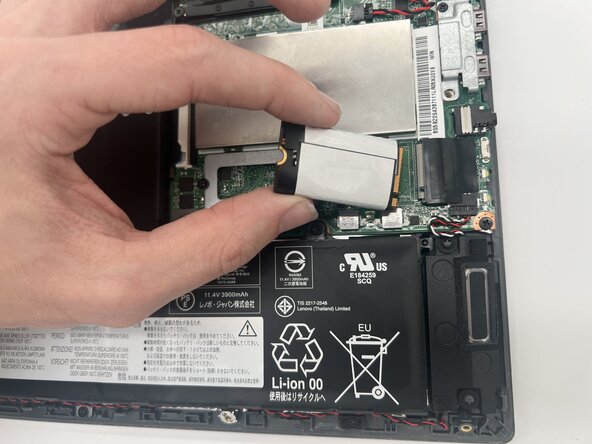
  5. Lenovo ThinkBook 14-IIL SSD Replacement: step 5, image 1 of 3 Lenovo ThinkBook 14-IIL SSD Replacement: step 5, image 2 of 3 Lenovo ThinkBook 14-IIL SSD Replacement: step 5, image 3 of 3
    • Gently grab the SSD, and pull in the direction it has lifted towards.

    Ask FixBot

    Add Comment

Conclusion

To reassemble your device, follow these instructions in reverse order.

Cancel: I did not complete this guide.

0 Guide Comments

Add Comment

View Statistics:

Past 24 Hours: 0

Past 7 Days: 2

Past 30 Days: 26

All Time: 83