Introduction
This guide will show you how to replace your Lenovo ThinkBook 13-IML Fans. This component cools down your device, preventing it from overheating.
You should do this guide if your laptop shows these signs: excessive heat on the bottom and keyboard areas, frequent shutdowns, or strange fan noises/the absence of fan noises.
In step 3.1, you are required to pull the fan sliding connectors out of their slots, this can be done with either a spudger or a clean fingernail.
Before beginning, make sure to power off your laptop completely and disconnect from any external power source.
What you need
-
-
-
Remove the nine 4.2 mm-long T5 Torx screws that secure the lower case.
-
Insert an opening tool into the seam between the lower case and chassis.
-
Pry around the entire perimeter until the lower case fully releases.
-
Remove the lower case.
 Ask FixBot
-
-
-
-
-
-
Remove the four 4 mm-long Phillips #00 screws securing the battery.
-
Use a spudger to push the battery connector out of its socket.
-
Remove the battery from the computer by pulling it up and out.
-
-
-
-
-
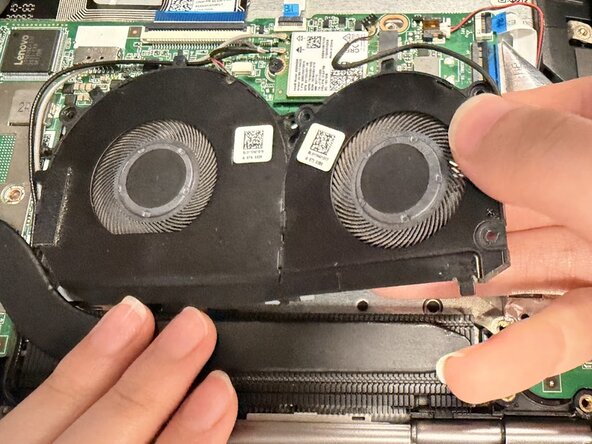
Detach the two sliding fan connectors from the system board by gently pulling them out of their sockets.
-
Use a screwdriver to unscrew the five 3.5 mm Phillips #00 screws that secure the fans in place.
-
Carefully lift the fans out of the system board.
-
-




To reassemble your device, follow these instructions in reverse order.

Team

UW Tacoma, Team E-2, Rose Winter 2026 Member of UW Tacoma, Team E-2, Rose Winter 2026
UWT-ROSE-W26SEG2
4 Members
44 Guides authored
