Free Shipping on Domestic Orders $75+

Lenovo Tab 2 A8 Audio/Video Port Replacement

What you need

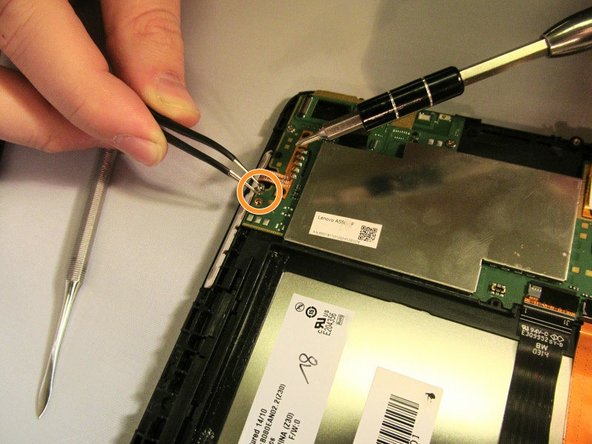
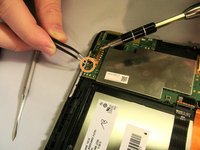
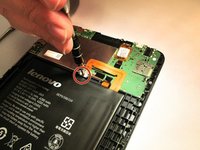
    1. Lenovo Tab 2 A8 Audio/Video Port Replacement, Removing the Back Panel: step 1, image 1 of 3 Lenovo Tab 2 A8 Audio/Video Port Replacement, Removing the Back Panel: step 1, image 2 of 3 Lenovo Tab 2 A8 Audio/Video Port Replacement, Removing the Back Panel: step 1, image 3 of 3
      Tool used on this step:
      Tweezers
      $4.99
      Buy
      • Place the tablet face down on a soft, stable surface that will protect the screen.

      • Next, Scrape off the seal over the screw in the back of the tablet with a Metal Spudger.

      • Use the Phillips #000 Screwdriver to remove the M1.4 × 2.5 screw.

      • If the seal covering the screw has already been removed, please proceed to the next step in the process.

      • As the screw is small, you may wish to extract it using a pair of tweezers.

      Ask FixBot

      Add Comment

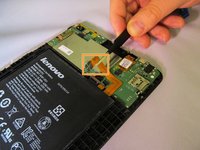
    2. Lenovo Tab 2 A8 Audio/Video Port Replacement: step 2, image 1 of 3 Lenovo Tab 2 A8 Audio/Video Port Replacement: step 2, image 2 of 3 Lenovo Tab 2 A8 Audio/Video Port Replacement: step 2, image 3 of 3
      • Starting on the side, work your way around the the tablet to pop off the back cover. You will want to utilize a metal Spudger for this.

      • Some force may be required initially to pry the back cover off.

      • Note that the button tabs for this device are loose inside the case and will fall out when opening.

      Ask FixBot

      Add Comment

    1. Lenovo Tab 2 A8 Audio/Video Port Replacement, Motherboard: step 3, image 1 of 3 Lenovo Tab 2 A8 Audio/Video Port Replacement, Motherboard: step 3, image 2 of 3 Lenovo Tab 2 A8 Audio/Video Port Replacement, Motherboard: step 3, image 3 of 3
      Tool used on this step:
      Tweezers
      $4.99
      Buy
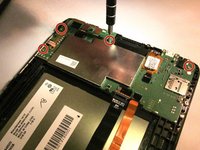
      • Using the Phillips #000 screwdriver, remove the four M1.4 × 2.5 screws holding the motherboard in place.

      • Because the screws are small, it is a good idea to remove them with a pair of tweezers.

      Ask FixBot

      Add Comment

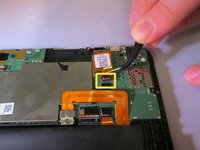
    2. Lenovo Tab 2 A8 Audio/Video Port Replacement: step 4, image 1 of 3 Lenovo Tab 2 A8 Audio/Video Port Replacement: step 4, image 2 of 3 Lenovo Tab 2 A8 Audio/Video Port Replacement: step 4, image 3 of 3
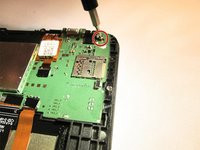
      • Remove the M1.4 × 2.5 screw securing the battery lead to the battery with the Phillips #000 screwdriver.

      • With a pair of tweezers, gently move the battery lead so it will not obstruct the motherboard.

      • With a pair of tweezers, carefully unplug the strip connecting the screen to the motherboard.

      • The strip connecting the screen to the motherboard is firmly in place and may require some careful use of strength to unplug it.

      Ask FixBot

      Add Comment

    3. Lenovo Tab 2 A8 Audio/Video Port Replacement: step 5, image 1 of 1
      • Remove the motherboard by lifting the top edge and pulling outward to free it from the small tabs that hold it in place.

      • The small tabs can be broken if the motherboard is pried up too forcefully.

      • The button tabs are fastened to the motherboard by a small adhesive strip. Take care in removing the motherboard to avoid tearing the wires.

      Ask FixBot

      Add Comment

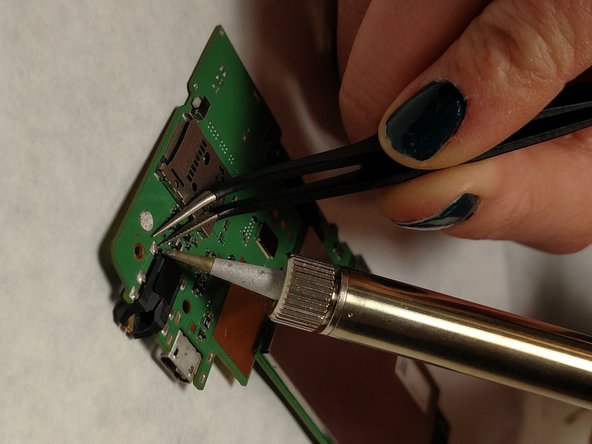
    1. Lenovo Tab 2 A8 Audio/Video Port Replacement, Audio/Video Port: step 6, image 1 of 2 Lenovo Tab 2 A8 Audio/Video Port Replacement, Audio/Video Port: step 6, image 2 of 2
      Tool used on this step:
      Tweezers
      $4.99
      Buy
      • Flip the motherboard to its back side.

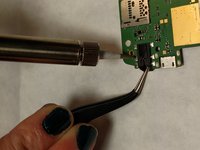
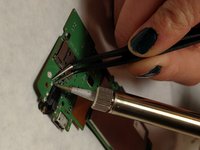
      • Desolder the six audio/visual port contact points.

      • Use tweezers to remove the existing audio jack to remove from the motherboard entirely.

      Ask FixBot

      Add Comment

Conclusion

To reassemble your device, follow these instructions in reverse order.

Cancel: I did not complete this guide.

One other person completed this guide.

Taylor Smith

Member since: 01/26/17

382 Reputation

2 Guides authored

Team

IUPUI, Team 2-4, Baechle Spring 2017 Member of IUPUI, Team 2-4, Baechle Spring 2017

IUPUI-BAECHLE-S17S2G4

4 Members

57 Guides authored

0 Guide Comments

Add Comment

View Statistics:

Past 24 Hours: 2

Past 7 Days: 6

Past 30 Days: 21

All Time: 931