Free Shipping on Domestic Orders $75+

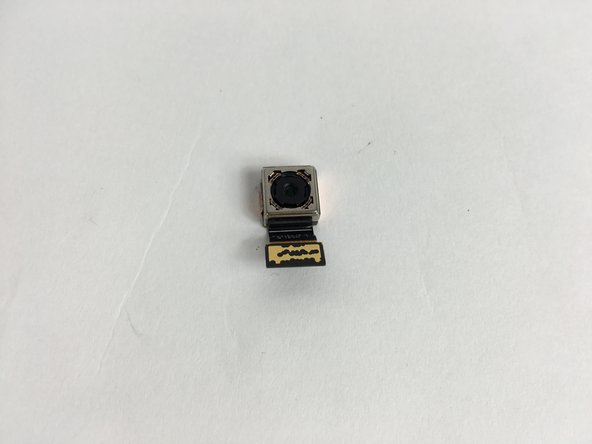
Lenovo Tab 2 A10-70 Rear Facing Camera Replacement

What you need

    1. Lenovo Tab 2 A10-70 Rear Facing Camera  Replacement, Rear Facing Camera: step 1, image 1 of 1
      • Before removing the camera, make sure the device is powered off

      • Use a plastic opening tool to pry open the back cover of the tablet..

      Ask FixBot

      Add Comment

    2. Lenovo Tab 2 A10-70 Rear Facing Camera  Replacement: step 2, image 1 of 1
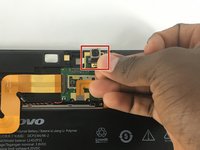
      • Locate the cable that is connecting the camera to the tablet

      Ask FixBot

      Add Comment

    3. Lenovo Tab 2 A10-70 Rear Facing Camera  Replacement: step 3, image 1 of 1
      • Disconnect the cable that is connecting the camera to the tablet

      Ask FixBot

      Add Comment

    4. Lenovo Tab 2 A10-70 Rear Facing Camera  Replacement: step 4, image 1 of 2 Lenovo Tab 2 A10-70 Rear Facing Camera  Replacement: step 4, image 2 of 2
      • Simply remove the camera from the tablet by lifting it up

      • Repeat Steps in reverse order with a new camera for reassembly

      Ask FixBot

      Add Comment

Conclusion

To reassemble your device, follow these instructions in reverse order.

Cancel: I did not complete this guide.

Tyler Hagenlocher

Member since: 02/08/16

350 Reputation

2 Guides authored

Team

USF Tampa, Team 12-6, Eyestone Spring 2016 Member of USF Tampa, Team 12-6, Eyestone Spring 2016

USFT-EYESTONE-S16S12G6

4 Members

45 Guides authored

0 Guide Comments

Add Comment

View Statistics:

Past 24 Hours: 0

Past 7 Days: 9

Past 30 Days: 36

All Time: 1,260