Free Shipping on Domestic Orders $75+

Lenovo IdeaPad Z570 Disc Drive Replacement

What you need

    1. Lenovo IdeaPad Z570 Disc Drive Replacement, Battery: step 1, image 1 of 1
      • Place the laptop face down with the battery facing away from you

      Ask FixBot

      Add Comment

    2. Lenovo IdeaPad Z570 Disc Drive Replacement: step 2, image 1 of 1
      • Flip the right switch right-bound

      Ask FixBot

      Add Comment

    3. Lenovo IdeaPad Z570 Disc Drive Replacement: step 3, image 1 of 1
      • Hold the left switch.

      Ask FixBot

      Add Comment

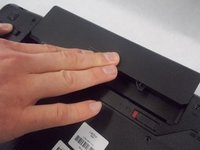
    4. Lenovo IdeaPad Z570 Disc Drive Replacement: step 4, image 1 of 2 Lenovo IdeaPad Z570 Disc Drive Replacement: step 4, image 2 of 2
      • Push the battery forward lightly to remove it while holding the left switch.

      Ask FixBot

      Add Comment

    1. Lenovo IdeaPad Z570 Disc Drive Replacement, Disc Drive: step 5, image 1 of 1
      • Place the laptop face down with the battery slot facing away from you.

      Ask FixBot

      Add Comment

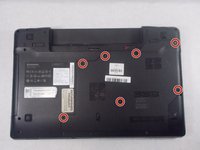
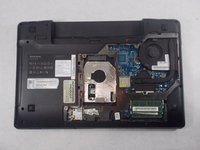
    2. Lenovo IdeaPad Z570 Disc Drive Replacement: step 6, image 1 of 2 Lenovo IdeaPad Z570 Disc Drive Replacement: step 6, image 2 of 2
      • Loosen all seven 3mm screws from the back panel using a Phillips #0 screwdriver.

      • These screws cannot be removed from the device.

      • Remove the back panel from the device.

      Ask FixBot

      Add Comment

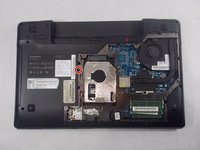
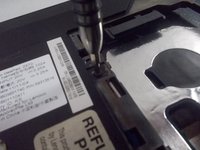
    3. Lenovo IdeaPad Z570 Disc Drive Replacement: step 7, image 1 of 2 Lenovo IdeaPad Z570 Disc Drive Replacement: step 7, image 2 of 2
      • Remove the 3 mm Phillips #0 screw located on the left hand side that holds the disc drive in place.

      Ask FixBot

      Add Comment

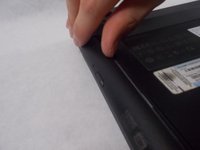
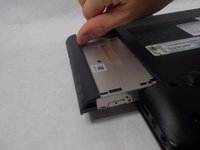
    4. Lenovo IdeaPad Z570 Disc Drive Replacement: step 8, image 1 of 2 Lenovo IdeaPad Z570 Disc Drive Replacement: step 8, image 2 of 2
      • Gently remove the disc drive from the left hand side of the laptop.

      Ask FixBot

      Add Comment

Conclusion

To reassemble your device, follow these instructions in reverse order.

Cancel: I did not complete this guide.

One other person completed this guide.

Daniel Lopes

Member since: 03/08/19

646 Reputation

3 Guides authored

Team

0 Guide Comments

Add Comment

View Statistics:

Past 24 Hours: 2

Past 7 Days: 7

Past 30 Days: 34

All Time: 1,075