Introduction
If there is not enough RAM for the laptop to run, you will need to replace or add more RAM. Follow this guide to replace or add more RAM.
RAM is an important part of the laptop because it allows for easy access to information, do not enough RAM limits the laptop which can prevent it from turning on.
What you need
-
-
-
Flip the laptop upside down so that the bottom is facing up.
-
Use a Phillips #0 screwdriver to remove the eleven screws (two 1.5 mm screws, one 0.3 mm screw, and eight 0.5 mm screws) that secure the bottom cover.
 Ask FixBot
-
-
-
-
Use a Jimmy or plastic opening tool to pop up the cover and remove it from the laptop.
-
-
-
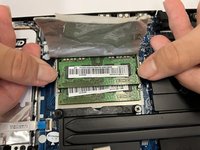
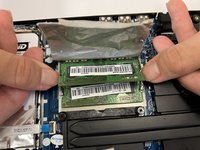
Place fingers on the latch that pops out the RAM sticks in the sides.
-
Push down on the latches to pop out the RAM sticks, they can now be pulled out and be replaced.
-
-


To reassemble your device, follow these instructions in reverse order.

Team

CSU Los Angeles, Team 6-6, Adachi Fall 2022 Member of CSU Los Angeles, Team 6-6, Adachi Fall 2022
CSULA-ADACHI-F22S6G6
4 Members
36 Guides authored
