Introduction
This guide outlines how to remove and replace RAM in a Lenovo IdeaPad S400 Touch. Replacing the RAM in your Lenovo IdeaPad could increase the performance of the computer, and can be done by following these four steps.
What you need
-
-
-
Turn your computer over so the back is face up.
-
Use your forefinger to unlock the two tabs located on the back. Slide the tabs until you see the red showing.
-
The battery cover will then pop up allowing you access to the battery.
 Ask FixBot
-
-
-
-
-
Remove the five 6mm Phillips #0 screws from the back panel.
-
Pull back the rubber tabs from the corners of the laptop backing to expose the screws.
-
Remove the four 4mm Phillips #0 screws that are underneath the rubber tabs.
-
Remove the three 6mm Phillips #0 screws from under the battery.
-
-
-
-
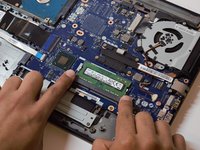
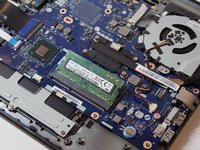
Push the metal arms away from the RAM.
-
The RAM should pop up.
-
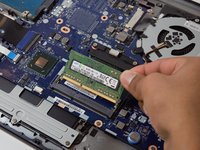
Pull the RAM out.
-
-


To reassemble your device, follow these instructions in reverse order.
Cancel: I did not complete this guide.
2 other people completed this guide.

Team

Western Carolina University, Team S1-G6, Virtue Spring 2019 Member of Western Carolina University, Team S1-G6, Virtue Spring 2019
WCU-VIRTUE-S19S1G6
5 Members
60 Guides authored
