15% Off Selected iFixit Tools — Limited Time
Free Shipping on Domestic Orders $75+

Lenovo IdeaPad N586 Memory Replacement

What you need

  1. Lenovo IdeaPad N586 Memory Replacement, Battery: step 1, image 1 of 2 Lenovo IdeaPad N586 Memory Replacement, Battery: step 1, image 2 of 2
    • To unlock the battery, flip the laptop over so that the bottom is facing upward. Then unlock the left clip by pushing the clip to the left.

    Ask FixBot

    Add Comment

  2. Lenovo IdeaPad N586 Memory Replacement: step 2, image 1 of 2 Lenovo IdeaPad N586 Memory Replacement: step 2, image 2 of 2
    • Now push the right clip to the right and hold it while using your other hand to pull the battery out.

    Ask FixBot

    Add Comment

  3. Lenovo IdeaPad N586 Memory Replacement, Back Panel: step 3, image 1 of 1
    • Remove the two screws highlighted.

    Ask FixBot

    Add Comment

  4. Lenovo IdeaPad N586 Memory Replacement: step 4, image 1 of 1
    • This is the back of the laptop with the cover removed.

    Ask FixBot

    Add Comment

  5. Lenovo IdeaPad N586 Memory Replacement, Memory: step 5, image 1 of 2 Lenovo IdeaPad N586 Memory Replacement, Memory: step 5, image 2 of 2
    • Now push the little clips out away from the memory to unlock the memory.

    Ask FixBot

    Add Comment

  6. Lenovo IdeaPad N586 Memory Replacement: step 6, image 1 of 1
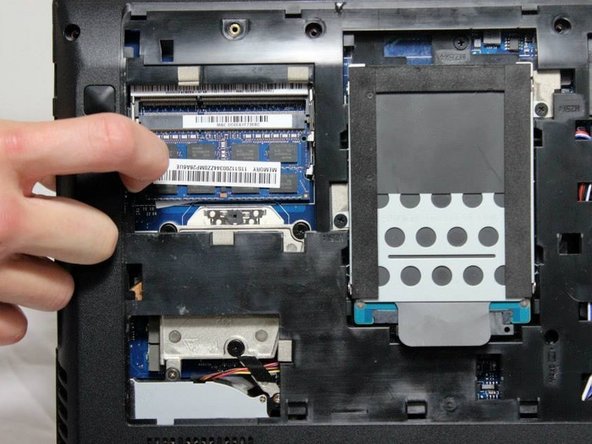
    • After unlocking the memory from it's position, pull the memory out.

    Ask FixBot

    Add Comment

Conclusion

To reassemble your device, follow these instructions in reverse order.

Cancel: I did not complete this guide.

Christopher

Member since: 04/08/14

676 Reputation

6 Guides authored

Team

Cal Poly, Team 8-7, Regan Spring 2014 Member of Cal Poly, Team 8-7, Regan Spring 2014

CPSU-REGAN-S14S8G7

5 Members

10 Guides authored

0 Guide Comments

Add Comment

View Statistics:

Past 24 Hours: 0

Past 7 Days: 5

Past 30 Days: 32

All Time: 840