This translation was generated by a machine and has not been reviewed by a person yet. Speak this language? Review it.
Introduction
Is the screen on your G500 broken? Simply replace it!
Before beginning the repair, turn off your device and disconnect all connectors.
Be sure to use an ESD mat or ESD bracelet.
Be careful when handling the battery; if it is swollen, you must take safety precautions.
What you need
-
-
-
First you have to release the "lock" for the battery. You can do this by simply pushing the two sliders in the direction of the arrows.
 Ask FixBot
-
-
-
Now you can pull the battery out and up. It might be a little tight, so feel free to use a little more force.
-
-
-
-
-
-
After you have removed the replacement battery, let's take a look at the display.
-
You will now need a thin tool such as a plastic card or a Jimmy. Use this tool to find a small gap between the laptop lid and the cover for the display edge. Insert the tool into the gap and pry open the clips.
-
Now work your way around the entire edge of the laptop.
-
-
-
Now you can carefully fold down the cover to access the back of the display and the sides.
-
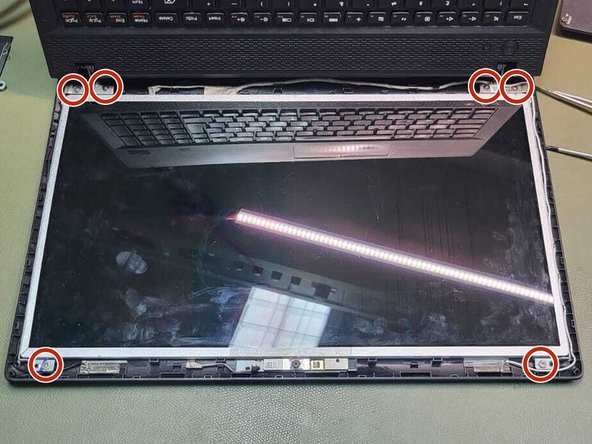
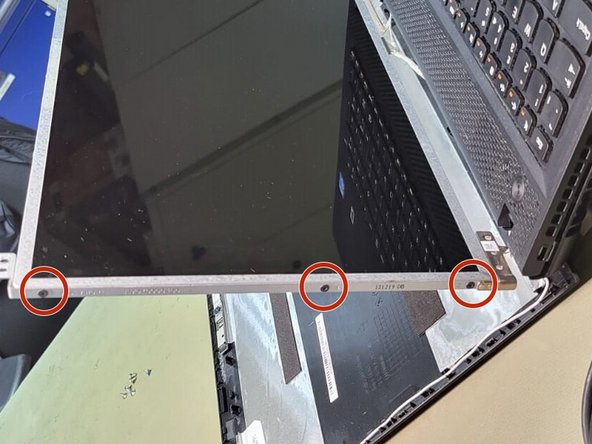
Remove the six marked screws.
-
-
-
The connector is secured with a sticker. The sticker is marked in yellow here.
-
Carefully peel off the sticker and then pull the connector away from the display in the direction of the arrow.
-
-





Follow these steps in reverse order to reassemble your device.

