Introduction
This guide shows how to replace or upgrade the RAM in the Lenovo IdeaPad Flex-14IWL. Replacing the RAM can improve system performance, especially if the device is experiencing slow operation or difficulty running multiple applications. Before starting, power off the laptop and disconnect all cables. Handle the RAM module carefully and avoid touching the gold connector pins to prevent static damage.
What you need
-
-
-
Shut down the laptop completely.
-
Disconnect the charger and all external devices.
-
Flip the laptop over so the lower case is facing upward.
 Ask FixBot
-
-
-
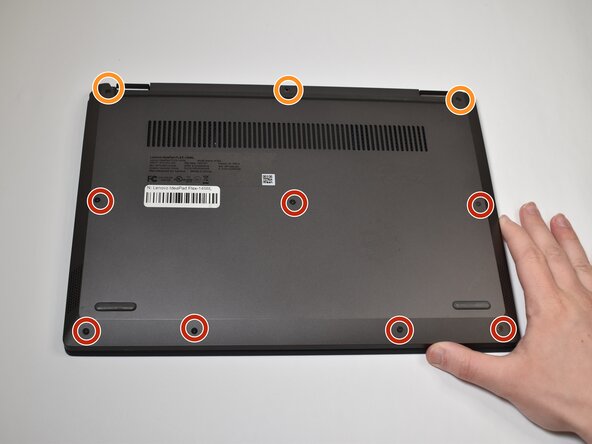
Use a Phillips screwdriver to remove the following screws securing the lower case:
-
Seven 2.5 mm-long
-
Three 5.5 mm-long
-
-
-
-
Insert an opening pick into the seam between the lower case and chassis.
-
Slide and pry with the pick around the entire perimeter until the lower case fully releases.
-
Remove the lower case.
-
-
-
-
-
Use your fingernails to "walk" the battery connector directly out of its motherboard socket.
-
Locate the RAM module at the center of the motherboard.
-
-
-
Two clips secure the RAM module in place, one on each side. Using your fingers, spread the clips away from the RAM module.
-
Pull the RAM stick out of its socket at a 30° angle.
-
-




To reassemble your device, follow the above steps in reverse order.
Take your e-waste to an R2 or e-Stewards certified recycler.
Repair didn’t go as planned? Try some basic troubleshooting or ask our Answers community for help.

Team

Purdue University Northwest, Team 8-16, Dieterle Spring 2026 Member of Purdue University Northwest, Team 8-16, Dieterle Spring 2026
PNW-DIETERLE-S26S8G16
4 Members
60 Guides authored
