
Lenovo IdeaPad 3-14IIL05 RAM Replacement

Emily Hesketh and 3 other contributors
Last updated on Dec 30, 2024
Views: 853
View statistics:
- Past 24 Hours:
- 2
- Past 7 Days:
- 31
- Past 30 Days:
- 112
- All Time:
- 853
Comments: 0
No one has left comments on this guide. Will you be first?
Go to guide commentsCompleted: 0 1
No one has marked this guide "completed." Will you be the first?
1 person has marked this guide "completed." It's you — great job!
Favorites: 0 1
No one has favorited (and subscribed to) this guide. Will you be the first?
1 person has favorited (and subscribed to) this guide — and that's you!
Introduction
Go to step 1 ↓Use this guide to replace the RAM in your Lenovo IdeaPad 3-14IIL05.
The RAM is the memory of the computer. If your computer is running slow, look in your task manager and observe to see if the RAM is the issue. If it is, consider upgrading.
What you need
Tools

-
-
-
Flip the laptop with the screen side facing down and the back panel facing you.
-
Remove the six 1.2 mm screws and the four 0.6 mm screws using a Phillips #1 screwdriver.
 Ask FixBot
-
-
-
-
-
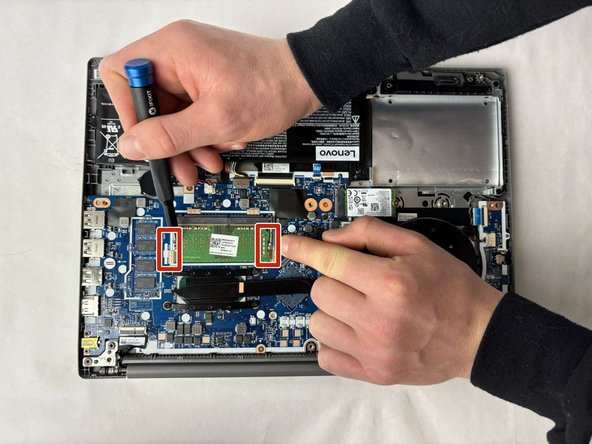
Hold the two clips on either end of the short side of the RAM and push them apart.
-
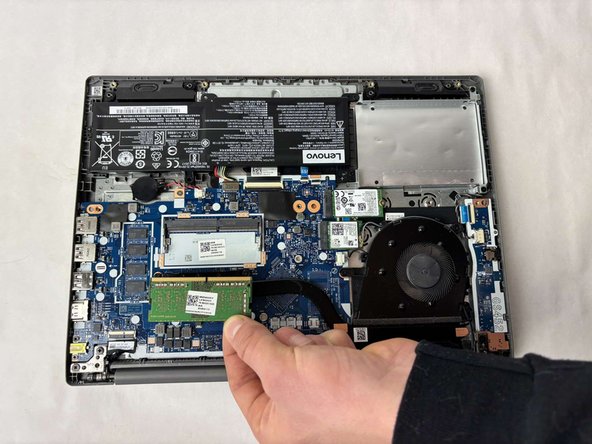
Remove the RAM.
-
-
-




To reassemble your device, follow these instructions in reverse order.

Team

UMass Dartmouth, Team 1-3, Konn Fall 2024 Member of UMass Dartmouth, Team 1-3, Konn Fall 2024
UMASSD-KONN-F24S1G3
5 Members
60 Guides authored
