
Lenovo IdeaPad 3 14IML05 RAM Replacement

Trenton and 3 other contributors
Last updated on Jan 8, 2026
Views: 536
View statistics:
- Past 24 Hours:
- 2
- Past 7 Days:
- 26
- Past 30 Days:
- 105
- All Time:
- 536
Comments: 0
No one has left comments on this guide. Will you be first?
Go to guide commentsCompleted: 0 1
No one has marked this guide "completed." Will you be the first?
1 person has marked this guide "completed." It's you — great job!
Favorites: 0 1
No one has favorited (and subscribed to) this guide. Will you be the first?
1 person has favorited (and subscribed to) this guide — and that's you!
Action Shots
Be an action hero! This guide needs images that better demonstrate how to perform specific actions.
Needs More Images
A few more images would make this guide's procedures crystal clear.
Better Introduction
Improve this guide by completing or revising its introduction.
Introduction
Go to step 1 ↓This guide explains how to replace or upgrade the RAM module in a Lenovo IdeaPad 3 (14IML05). Replacing the RAM can improve system performance, responsiveness, and multitasking capability.
Before beginning the repair, power off the laptop completely and disconnect the charger.
Component Damage: Do not force open plastic clips; they may break.
What you need
Parts

Tools

-
-
-
Use a Phillips screwdriver to loosen the ten captive screws securing the bottom cover.
-
Insert a plastic opening tool into the seam between the bottom and top cover and slide it around the perimeter to release the clips holding them together.
-
Remove back panel.
 Ask FixBot
-
-
-
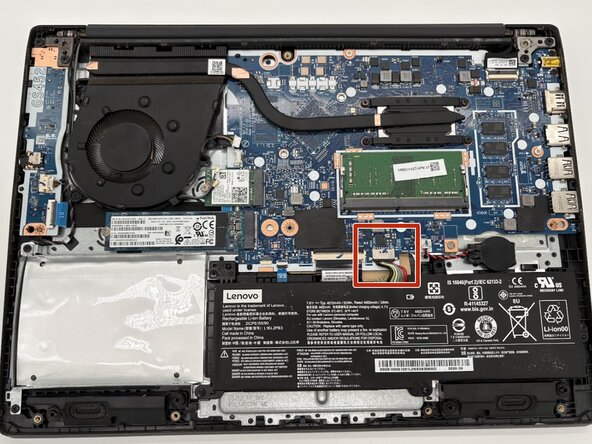
Use the point of a spudger to push on alternating sides of the battery connector to "walk" it out of its socket on the motherboard.
-
-
-
-
Push the metal retaining clips away from the RAM chip.
-
Hold the RAM module by its edges and pull it straight out of the slot.
-
-



To reassemble your device, follow these instructions in reverse order. Take your e-waste to an R2 or e-Stewards certified recycler.

Team

University of North Texas, Team 5-5, Kilpatrick Fall 2025 Member of University of North Texas, Team 5-5, Kilpatrick Fall 2025
UNT-KILPATRICK-F25S5G5
4 Members
60 Guides authored
