
Lenovo G50-70 Optrical Drive Replacement

Caleb DesJardins and one other contributor
Last updated on Jan 9, 2019
Views: 2.6K
View statistics:
- Past 24 Hours:
- 2
- Past 7 Days:
- 22
- Past 30 Days:
- 100
- All Time:
- 2,579
Comments: 1
1 guide comment.
Go to guide commentsCompleted: 1 2
1 person has marked this guide "completed." Will you be next?
2 people have marked this guide "completed." Including you — great job!
Favorites: 0 1
No one has favorited (and subscribed to) this guide. Will you be the first?
1 person has favorited (and subscribed to) this guide — and that's you!
Introduction
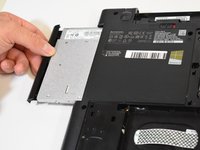
Go to step 1 ↓This guide can be used if the optical drive is malfunctioning. Removing the optical drive is also required before the main cover can be opened up.
What you need
Tools

-
-
-
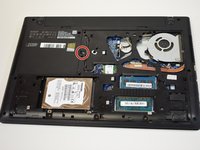
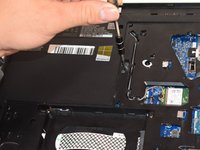
Remove the three 6mm Phillips #0 screws holding the back access panel on.
 Ask FixBot
-
-
-
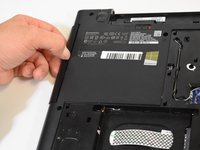
Slide the cover toward you to unlatch it.
-
The edge of the panel will slide away from the laptop so it can be lifted.
-
-
-




To reassemble your device, follow these instructions in reverse order.
Cancel: I did not complete this guide.
One other person completed this guide.

Team

Central Washington University, Team S1-G7, Pengilly Fall 2018 Member of Central Washington University, Team S1-G7, Pengilly Fall 2018
CWU-PENGILLY-F18S1G7
3 Members
72 Guides authored
