Introduction
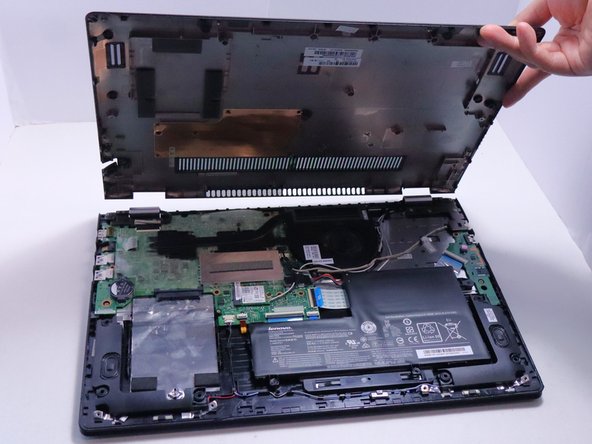
This guide will show you how to remove the back cover for the Lenovo Flex 3-1580.
What you need
-
-
-
Remove eleven 6.0 mm screws from the bottom cover using a JIS #1 screwdriver.
 Ask FixBot
-
-
-
-
Loosen the backing cover by sliding a spudger along the edges.
-
Remove the bottom cover from the laptop.
-
-




Conclusion
To reassemble your device, follow these instructions in reverse order.

Team

Austin Community College, Team 7-1, Watkins Spring 2025 Member of Austin Community College, Team 7-1, Watkins Spring 2025
AUSTINCC-WATKINS-S25S7G1
4 Members
71 Guides authored
