
Lenovo Essential G570 Battery Replacement

Nina Francisco and 2 other contributors
Last updated on May 23, 2018
Views: 1.8K
View statistics:
- Past 24 Hours:
- 1
- Past 7 Days:
- 17
- Past 30 Days:
- 77
- All Time:
- 1,761
Comments: 0
No one has left comments on this guide. Will you be first?
Go to guide commentsCompleted: 3 4
3 people have marked this guide "completed." Will you be next?
4 people have marked this guide "completed." Including you — great job!
Favorites: 0 1
No one has favorited (and subscribed to) this guide. Will you be the first?
1 person has favorited (and subscribed to) this guide — and that's you!
Introduction
Go to step 1 ↓The Lenovo G570 has a 6-cell Lithium-ion battery that fits into the bottom side of the computer. Battery removal is an essential first step to any further repair or disassembly of the device.
-
-
-
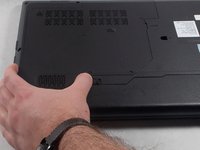
Turn off the laptop.
-
Disconnect the charging cable.
-
Turn the computer upside down.
 Ask FixBot
-
-
-
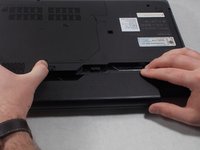
Locate the two switches that lock the battery.
-
Push the right switch outwards to unlock the battery.
-
-
-
-
Push and hold the left switch outwards to unlock the battery.
-
Pull the battery away from the computer.
-
-


To reassemble your device, follow these instructions in reverse order.
Cancel: I did not complete this guide.
3 other people completed this guide.

Team

UMass Dartmouth, Team S1-G1, Simcock Spring 2018 Member of UMass Dartmouth, Team S1-G1, Simcock Spring 2018
UMASSD-SIMCOCK-S18S1G1
3 Members
72 Guides authored
