Free Shipping on Domestic Orders $75+

Lenovo Essential G555-0873 CPU Replacement

What you need

  1. Lenovo Essential G555-0873 CPU Replacement, Bottom Panel: step 1, image 1 of 1
    • Unscrew the two 5.1 mm screws that secure the bottom cover.

    • Note that the screws will not come all the way out of the sockets.

    Ask FixBot

    Add Comment

  2. Lenovo Essential G555-0873 CPU Replacement: step 2, image 1 of 1
    • Lift from the notch until the back panel comes up.

    Ask FixBot

    Add Comment

  3. Lenovo Essential G555-0873 CPU Replacement, Fan: step 3, image 1 of 1
    • Disconnect the fan from the motherboard by pulling the plug shown in the picture.

    Ask FixBot

    Add Comment

  4. Lenovo Essential G555-0873 CPU Replacement: step 4, image 1 of 1
    • Unscrew the three 4.6mm screws shown in the picture.

    Ask FixBot

    Add Comment

  5. Lenovo Essential G555-0873 CPU Replacement: step 5, image 1 of 1
    • Gently lift the fan straight up until it is lifted out of the case.

    Ask FixBot

    Add Comment

  6. Lenovo Essential G555-0873 CPU Replacement, Heat Sink: step 6, image 1 of 1
    • Unscrew the four 7.3 mm screws shown in the picture.

    • Note that springs are attached to the screws. Do not remove the springs.

    Ask FixBot

    Add Comment

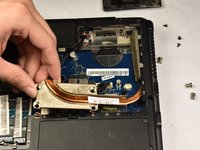
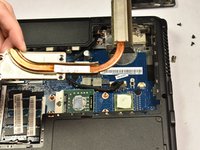
  7. Lenovo Essential G555-0873 CPU Replacement: step 7, image 1 of 2 Lenovo Essential G555-0873 CPU Replacement: step 7, image 2 of 2
    • Pull the heat sink assembly out of the laptop.

    Ask FixBot

    Add Comment

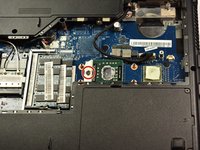
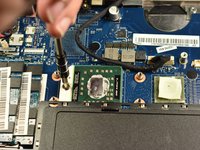
  8. Lenovo Essential G555-0873 CPU Replacement, CPU: step 8, image 1 of 2 Lenovo Essential G555-0873 CPU Replacement, CPU: step 8, image 2 of 2
    • Use a flat-head screwdriver on the hinge shown, and turn counter-clockwise to the unlock position

    Ask FixBot

    Add Comment

  9. Lenovo Essential G555-0873 CPU Replacement: step 9, image 1 of 1
    • Remove the CPU

    • There will be old thermal paste on the CPU and heat sink which should be wiped off using microfiber cloth.

    • Before putting the heat sink back in, a small droplet of thermal paste should be applied onto the center of the CPU.

    Ask FixBot

    Add Comment

Conclusion

To reassemble your device, follow these instructions in reverse order.

Cancel: I did not complete this guide.

One other person completed this guide.

0 Guide Comments

Add Comment

View Statistics:

Past 24 Hours: 3

Past 7 Days: 10

Past 30 Days: 42

All Time: 717