Free Shipping on Domestic Orders $75+

Lenovo Edge 2-1580 Fan Replacement

Views: 1.2K

View statistics:

Past 24 Hours:
2
Past 7 Days:
20
Past 30 Days:
91
All Time:
1,212
Comments: 3

1 comment on steps, 2 guide comments.

Go to guide comments
Completed: 0

No one has marked this guide "completed." Will you be the first?

Favorites: 0

No one has favorited (and subscribed to) this guide. Will you be the first?

Time Required: 20 - 25 minutes
Difficulty: Moderate
Lenovo Edge 2-1580 Fan Replacement

Introduction

Go to step 1 ↓

This guide will show you how to remove and replace the fan cooling solution of the laptop if for some reason it has become faulty and needs replacement.

What you need

Tools

    1. Lenovo Edge 2-1580 Fan Replacement, Battery: step 1, image 1 of 2 Lenovo Edge 2-1580 Fan Replacement, Battery: step 1, image 2 of 2
      • Using the Phillips #0 screwdriver, remove the (11) eleven 5.4 mm screws from the back panel.

      Ask FixBot

      Add Comment

    2. Lenovo Edge 2-1580 Fan Replacement: step 2, image 1 of 2 Lenovo Edge 2-1580 Fan Replacement: step 2, image 2 of 2
      • Using a plastic opening tool, pull out the back panel from the laptop.

      Ask FixBot

      Add Comment

    3. Lenovo Edge 2-1580 Fan Replacement: step 3, image 1 of 3 Lenovo Edge 2-1580 Fan Replacement: step 3, image 2 of 3 Lenovo Edge 2-1580 Fan Replacement: step 3, image 3 of 3
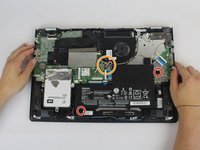
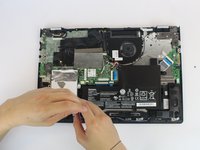
      • Using the Phillips #0 screwdriver, remove the (2) 5.4 mm screws.

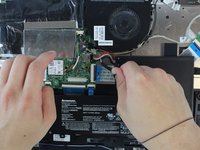
      • Disconnect the battery connector from the motherboard.

      Ask FixBot

      Add Comment

    4. Lenovo Edge 2-1580 Fan Replacement: step 4, image 1 of 1
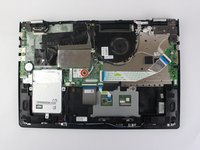
      • Pull the battery outward and remove it from the rest of the laptop.

      Ask FixBot

      Add Comment

    1. Lenovo Edge 2-1580 Fan Replacement, Fan: step 5, image 1 of 3 Lenovo Edge 2-1580 Fan Replacement, Fan: step 5, image 2 of 3 Lenovo Edge 2-1580 Fan Replacement, Fan: step 5, image 3 of 3
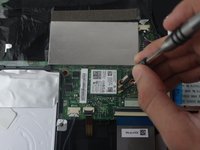
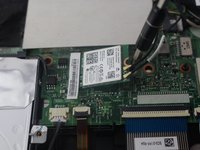
      • Remove the 5.4 mm Phillips #0 screw holding the Wireless Network Card.

      • The network card will pop up by itself.

      Ask FixBot

      Add Comment

    2. Lenovo Edge 2-1580 Fan Replacement: step 6, image 1 of 2 Lenovo Edge 2-1580 Fan Replacement: step 6, image 2 of 2
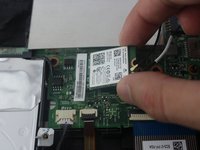
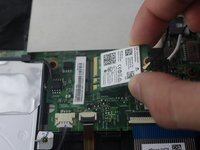
      • Grab the network card and gently pull it out.

      Ask FixBot

      Add Comment

    3. Lenovo Edge 2-1580 Fan Replacement: step 7, image 1 of 2 Lenovo Edge 2-1580 Fan Replacement: step 7, image 2 of 2
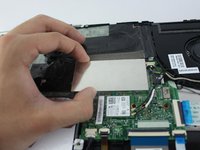
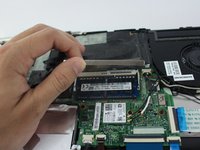
      • Pull out the RAM metallic cover.

      Ask FixBot

      Add Comment

    4. Lenovo Edge 2-1580 Fan Replacement: step 8, image 1 of 2 Lenovo Edge 2-1580 Fan Replacement: step 8, image 2 of 2
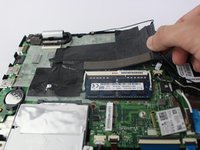
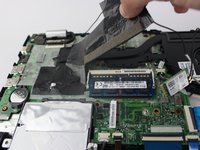
      • Grab the black insulating tape and pull it out.

      Ask FixBot

      Add Comment

    5. Lenovo Edge 2-1580 Fan Replacement: step 9, image 1 of 2 Lenovo Edge 2-1580 Fan Replacement: step 9, image 2 of 2
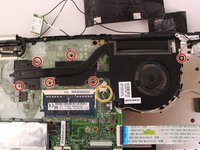
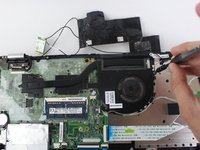
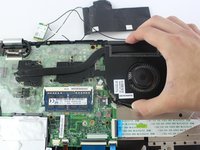
      • Using the Phillips #0 screwdriver, remove the (6) six fan screws from the device.

      • (5) Five copper and (1) one silver Phillips #0 5.4mm screws.

      • Disconnect the fan from the motherboard.

      Ask FixBot

      Add Comment

    6. Lenovo Edge 2-1580 Fan Replacement: step 10, image 1 of 2 Lenovo Edge 2-1580 Fan Replacement: step 10, image 2 of 2
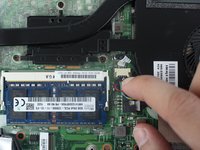
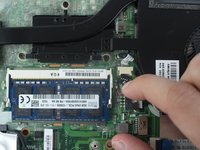
      • Unplug the Fan connector from its socket on the motherboard.

      Ask FixBot

      Add Comment

    7. Lenovo Edge 2-1580 Fan Replacement: step 11, image 1 of 2 Lenovo Edge 2-1580 Fan Replacement: step 11, image 2 of 2
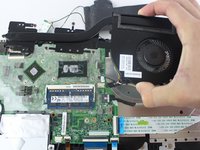
      • Carefully remove the fan from the laptop.

      Ask FixBot

      Add Comment

Conclusion

To reassemble your device, follow these instructions in reverse order.

Cancel: I did not complete this guide.

Julian Escallon

Member since: 09/27/17

735 Reputation

5 Guides authored

Team

USF Tampa, Team S14-G1, Boczar Fall 2017 Member of USF Tampa, Team S14-G1, Boczar Fall 2017

USFT-BOCZAR-F17S14G1

4 Members

60 Guides authored

2 Guide Comments

Looks like heat sink and fan are one unit. Advice for regular dust cleaning? How was the condition of the factory thermal paste?

cfryhover - Reply Share

Where can one find this fan?

Gabriel Rivera - Reply Share

Add Comment

View Statistics:

Past 24 Hours: 2

Past 7 Days: 20

Past 30 Days: 91

All Time: 1,212