Introduction
This guide shows how to remove and replace a Lenovo 300e Chromebook battery. A faulty battery is one of the most common issues but is also one of the easiest problems to fix.
If your device will not stay charged, or can only function while plugged in, it may be due to the age of the battery, or due to ‘swelling’ of the lithium-ion battery. Swollen batteries can release gasses that cause a fire hazard, so it is important to remove them immediately.
See Lenovo’s troubleshooting guide for battery issues before replacing your battery. To safely dispose of the used battery, determine how you can recycle it using this guide.
Discharge your battery and unplug your laptop before beginning.
What you need
-
-
-
Remove eleven 5 mm screws from the back of the computer using a Phillips #2 screwdriver.
 Ask FixBot
-
-
-
Use a spudger along the edge of the Chromebook to gently remove the back cover of the laptop.
-
-
-
-
-
-
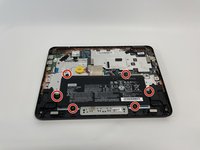
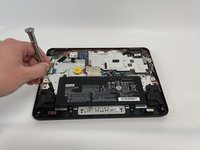
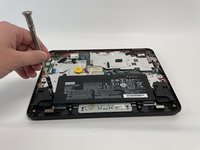
Remove six 3 mm screws from the battery with a Phillips #2 screwdriver.
-
-
-
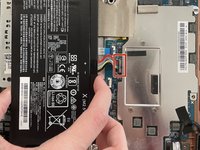
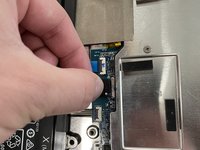
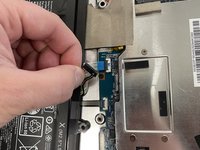
Disconnect the wiring harness that connects the battery to the motherboard.
-
Lift the battery up and out of the laptop.
-
-




To reassemble your device, follow these instructions in reverse order with the new battery.
Cancel: I did not complete this guide.
One other person completed this guide.

Team

Western Carolina University, Team 1-5, Virtue Fall 2021 Member of Western Carolina University, Team 1-5, Virtue Fall 2021
WCU-VIRTUE-F21S1G5
4 Members
60 Guides authored
1 Guide Comment
I changed out my battery from another Lenovo where the battery was working and my Chromebook still won't turn on
