Free Shipping on Domestic Orders $75+

Leapfrog My Own Leaptop Speaker Replacement Guide

What you need

  1. Leapfrog My Own Leaptop Speaker Replacement Guide, Battery: step 1, image 1 of 1
    • Flip over device so that back portion of the device is facing you.

    Ask FixBot
  2. Leapfrog My Own Leaptop Speaker Replacement Guide: step 2, image 1 of 1
    • Unscrew the one 10mm screw that holds the battery cover in place with a a PH1 phillips head screwdriver.

    • Please note that the screw cannot be removed as it is attached to the battery cover.

    Ask FixBot
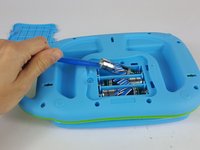
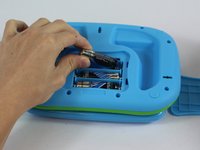
  3. Leapfrog My Own Leaptop Speaker Replacement Guide: step 3, image 1 of 2 Leapfrog My Own Leaptop Speaker Replacement Guide: step 3, image 2 of 2
    • Carefully pry the batteries out with a plastic opening tool prying from the non spring side.

    • Remove the three AA batteries.

    • Note the direction of the batteries for when reassembling.

    Ask FixBot
  4. Leapfrog My Own Leaptop Speaker Replacement Guide, Speaker: step 4, image 1 of 1
    • Remove the eleven 10mm screws from the back of the device with a a PH1 phillips head screwdriver.

    Ask FixBot
  5. Leapfrog My Own Leaptop Speaker Replacement Guide: step 5, image 1 of 1
    • Carefully remove back of the device.

    • Make sure not to rip the wires when lifting the cover off.

    Ask FixBot
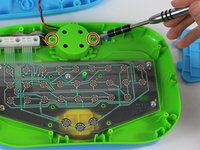
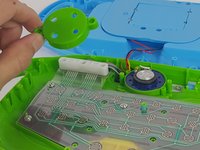
  6. Leapfrog My Own Leaptop Speaker Replacement Guide: step 6, image 1 of 2 Leapfrog My Own Leaptop Speaker Replacement Guide: step 6, image 2 of 2
    • Unscrew the two 7.5 mm screws to the left and right of the speaker with a PH1 phillips head screwdriver.

    • Remove the cover and place to the side.

    Ask FixBot
  7. Leapfrog My Own Leaptop Speaker Replacement Guide: step 7, image 1 of 2 Leapfrog My Own Leaptop Speaker Replacement Guide: step 7, image 2 of 2
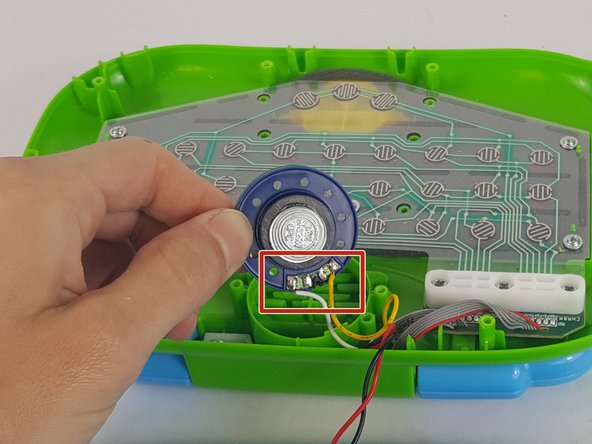
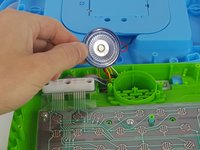
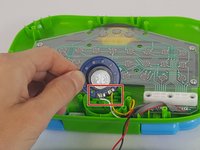
    • Once the cover is removed, gently lift up the speaker making sure not to rip or break the wires.

    • If you are disassembling the device to clean the speaker, clean it at this point with a soft, lightly dampened cloth.

    • Gently turn the speaker over and carefully desolder the white and yellow wires from the speaker.

    Ask FixBot
Conclusion

To reassemble your device, follow these instructions in reverse order.

Any issues that cannot be resolved with any portion of this wiki please contact Leapfrog Customer Serivce

4 other people completed this guide.

Jonathan Fitzer

Member since: 02/10/16

629 Reputation

3 Guides authored

Team

USF Tampa, Team 14-6, Lacy Spring 2016 Member of USF Tampa, Team 14-6, Lacy Spring 2016

USFT-LACY-S16S14G6

4 Members

6 Guides authored

5 Guide Comments

Thanks for this very useful instruction. Where can I buy a replacement speaker?

-Don

Don La - Reply Share

I agree, but I also second the question...where can I buy a replacement speaker?

Jimmy Liang - Reply Share

Where could I purchase a replacement speaker?

Zuzi - Reply Share

Where could I buy the replacement speaker in Malaysia?

stanley.met - Reply Share

Where can I buy replacement speaker in Malaysia? Appreciate yr reply

ribenabona - Reply Share

Add Comment

View Statistics:

Past 24 Hours: 0

Past 7 Days: 15

Past 30 Days: 78

All Time: 7,872