Introduction
This guide is designed to instruct users on how properly replace dead or low batteries in the device. Tools will be necessary as well as new AA batteries.
What you need
-
-
-
-
Unscrew the one 10mm screw that holds the battery cover in place with a a PH1 phillips head screwdriver.
-
-
-
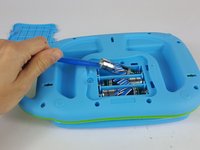
Carefully pry the batteries out with a plastic opening tool prying from the non spring side.
-
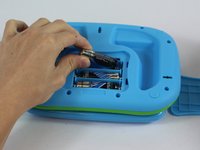
Remove the three AA batteries.
-

 Ask FixBot


Cancel: I did not complete this guide.
One other person completed this guide.

Team

USF Tampa, Team 14-6, Lacy Spring 2016 Member of USF Tampa, Team 14-6, Lacy Spring 2016
USFT-LACY-S16S14G6
4 Members
36 Guides authored
1 Guide Comment
Hi Jonathan! Your article is very helpful. But I have a big question now. I have opened the leaptop and see that membrane should be replaced. But where can I buy the membrane separately? Please help!
