Free Shipping on Domestic Orders $75+

Leapfrog LeapPad 3 Battery Replacement

What you need

    1. Leapfrog LeapPad 3 Battery Replacement, Battery: step 1, image 1 of 3 Leapfrog LeapPad 3 Battery Replacement, Battery: step 1, image 2 of 3 Leapfrog LeapPad 3 Battery Replacement, Battery: step 1, image 3 of 3
      Tool used on this step:
      Anti-Static Wrist Strap
      $7.95
      Buy
      • Before taking apart your device, ensure that it is turned off and that your anti-static wrist strap is secured to a ground.

      • Remove the six 10.0 mm Phillips #0 screws from the outer case and remove the cover with your hands.

      • You will not need to pry the case off.

      Ask FixBot

      Add Comment

    2. Leapfrog LeapPad 3 Battery Replacement: step 2, image 1 of 3 Leapfrog LeapPad 3 Battery Replacement: step 2, image 2 of 3 Leapfrog LeapPad 3 Battery Replacement: step 2, image 3 of 3
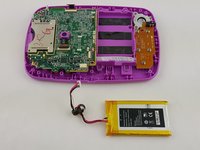
      • Unplug the battery from the motherboard with your hands.

      • The battery sits to the right of the motherboard.

      Ask FixBot

      Add Comment

    3. Leapfrog LeapPad 3 Battery Replacement: step 3, image 1 of 2 Leapfrog LeapPad 3 Battery Replacement: step 3, image 2 of 2
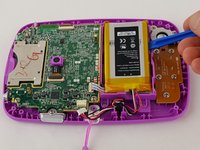
      • Pry the battery gently off of the plastic platform with an opening tool.

      • Do not to puncture the battery, as the material inside can be dangerous.

      Ask FixBot

      Add Comment

Conclusion

To reassemble your device, follow these instructions in reverse order.

Cancel: I did not complete this guide.

3 other people completed this guide.

Matt Irvine

Member since: 02/04/16

952 Reputation

6 Guides authored

Team

USF Tampa, Team 16-2, Blackwell Winter 2016 Member of USF Tampa, Team 16-2, Blackwell Winter 2016

USFT-BLACKWELL-W16S16G2

3 Members

72 Guides authored

1 Guide Comment

where can i purchase a battery, i have googled and come up with nothing.

martinez2503 - Reply Share

Add Comment

View Statistics:

Past 24 Hours: 4

Past 7 Days: 11

Past 30 Days: 48

All Time: 5,078