
Le Pan S Battery Replacement

Maria Dole and 4 other contributors
Last updated on Dec 16, 2015
Views: 6.1K
View statistics:
- Past 24 Hours:
- 2
- Past 7 Days:
- 19
- Past 30 Days:
- 94
- All Time:
- 6,082
Comments: 7
2 comments on steps, 5 guide comments.
Go to guide commentsCompleted: 3 4
3 people have marked this guide "completed." Will you be next?
4 people have marked this guide "completed." Including you — great job!
Favorites: 0 1
No one has favorited (and subscribed to) this guide. Will you be the first?
1 person has favorited (and subscribed to) this guide — and that's you!
Introduction
Go to step 1 ↓If the battery is too low for the device to turn on, replacing the battery may be necessary. If the device does not turn on after charging, the battery is most likely completely dead. When a battery is completely discharged, it oftentimes cannot be recharged. In this case, the battery is dead and needs to be replaced. No special skills or tools will be needed in order to complete this guide.
What you need
Tools
-
Spudger4.9


-
-
-
Remove the two 3.5 mm Phillips #00 screws that are covered by the micro SD port.
 Ask FixBot
-
-
-
Insert the spudger between the front and back panel in order to pry them apart.
-
Pry open the rest of the Le Pan S by dragging the spudger across the side.
-
-
-
Once the front and back faces are completely separated, remove the back cover to reveal the inside components.
-
-
-


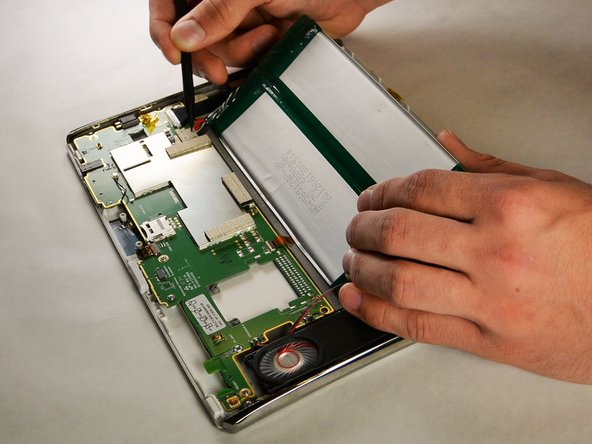
To reassemble your device, follow these instructions in reverse order.
Cancel: I did not complete this guide.
3 other people completed this guide.

Team

IUPUI, Team 2-1, Harley Fall 2015 Member of IUPUI, Team 2-1, Harley Fall 2015
IUPUI-HARLEY-F15S2G1
5 Members
60 Guides authored
5 Guide Comments
But what do I do when it's not the battery, but is the charger is so loose in the tablet, it won;t charge. Once in a while, I can get it to come on if I happened to hold the charger just right. So disgusting. Can this be fixed.? i have purchased two LePans and neither will charge.
Thank you Maria!
Easy to take apart. Disconnected/reconnected battery and voila!
All good.
Be well.
Den E
