
LG VX5400 Keypad Replacement

Vanessa Panchal and 6 other contributors
Last updated on Feb 4, 2018
Views: 2.8K
View statistics:
- Past 24 Hours:
- 0
- Past 7 Days:
- 4
- Past 30 Days:
- 36
- All Time:
- 2,783
Comments: 0
No one has left comments on this guide. Will you be first?
Go to guide commentsCompleted: 0 1
No one has marked this guide "completed." Will you be the first?
1 person has marked this guide "completed." It's you — great job!
Favorites: 0 1
No one has favorited (and subscribed to) this guide. Will you be the first?
1 person has favorited (and subscribed to) this guide — and that's you!
Missing Steps
Oops! This guide is currently missing one or more important steps.
Introduction
Go to step 1 ↓Often times the key pad could break or become worn. This repair guide will show you how to replace the the keypad of the LG VX5400.
What you need
Tools

-
-
-
Hold the phone case in your palm and slide the back cover towards yourself using your thumb
-
-
-
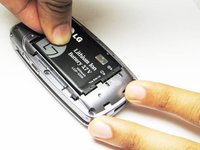
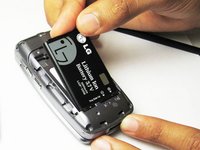
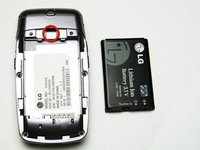
Slide a tool or finger into the notch at the top of the battery to carefully remove it.
-
-
-
-
Remove the rubber stopper from the back top of the phone with the pointed end of a spudger.
-
-
-
Use the Phillip screw driver to remove the hidden screw, which is marked by the red square
-
-
-
Gently split open the front and back of the bottom casing of the phone with fingers.
-
-
-

 Ask FixBot




To reassemble your device, follow these instructions in reverse order.

Team

Cal Poly, Team 26-26, Regan Spring 2010 Member of Cal Poly, Team 26-26, Regan Spring 2010
CPSU-REGAN-S10S26G26
4 Members
60 Guides authored
