Introduction
The motherboard is the central hub of communication for all components in a device. If you notice that one or more components are failing are not working in your device, it may be time to replace the motherboard.
This guide shows how to replace the motherboard of the LG Phoenix 2, model LG-K371. A motherboard replacement may be necessary if the phone is not working, is badly damaged, or running very poorly. A motherboard replacement may also be needed if the charge port has worn out and you do not want to solder.
What you need
-
-
-
Place a fingernail in the notch at the bottom edge of the phone.
-
Pull on the back cover with one hand while keeping the rest of the phone steady, and run your fingernail along the edge.
 Ask FixBot
-
-
-
Place a fingernail in the notch at the bottom edge of the battery.
-
Pull the battery out.
-
-
-
-
-
-
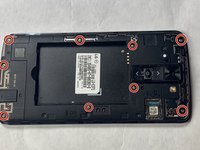
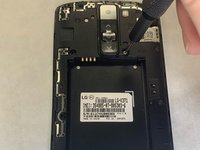
Remove all nine of the 3.0mm screws on the back of the phone using a Phillips #0 screwdriver, including the one attaching the camera lens.
-
-
-
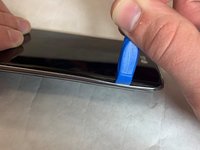
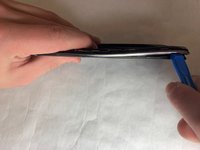
With the plastic opening tool, pry between the screen and the outer chrome edge to remove the bottom shield from the rest of the phone.
-
-
-
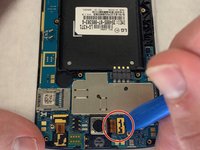
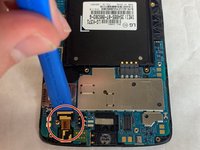
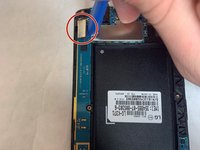
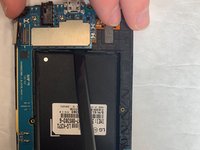
With a plastic opening tool, disconnect all three ribbon connectors from the motherboard: one for the front camera, one for the rear camera, and one for the screen.
-
-
-
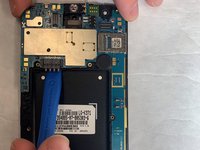
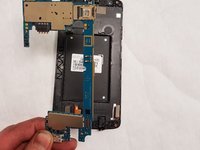
Using a plastic opening tool, separate the motherboard from the back frame and remove it from the device.
-
-








To reassemble your device, follow these instructions in reverse order.
Cancel: I did not complete this guide.
5 other people completed this guide.

Team

IUPUI, Team S1-G1, Harley Fall 2019 Member of IUPUI, Team S1-G1, Harley Fall 2019
IUPUI-HARLEY-F19S1G1
3 Members
24 Guides authored
