Free Shipping on Domestic Orders $75+

LG Optimus L7 P705 Charger Port Replacement

What you need

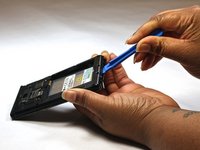
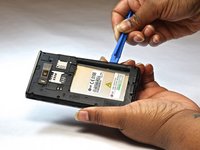
    1. LG Optimus L7 P705 Charger Port Replacement, Charger Port: step 1, image 1 of 2 LG Optimus L7 P705 Charger Port Replacement, Charger Port: step 1, image 2 of 2
      • Remove back cover.

      • Remove the battery and simcard.

      Ask FixBot

      Add Comment

    2. LG Optimus L7 P705 Charger Port Replacement: step 2, image 1 of 1
      • Remove the 12 screws (with the phillips head 000) around frame and near sim and sd cards.

      Ask FixBot

      Add Comment

    3. LG Optimus L7 P705 Charger Port Replacement: step 3, image 1 of 1
      • Remove bottom plate where the charger port is located.

      Ask FixBot

      Add Comment

    4. LG Optimus L7 P705 Charger Port Replacement: step 4, image 1 of 2 LG Optimus L7 P705 Charger Port Replacement: step 4, image 2 of 2
      • Remove the back piece.

      Ask FixBot

      Add Comment

    5. LG Optimus L7 P705 Charger Port Replacement: step 5, image 1 of 1
      • Using soldering iron, loosen the charger port from the bottom of the device.

      Ask FixBot

      Add Comment

    6. LG Optimus L7 P705 Charger Port Replacement: step 6, image 1 of 1
      • Using a smudger, lift the charger port and replace as necessary.

      Ask FixBot

      Add Comment

Conclusion

To reassemble your device, follow these instructions in reverse order.

Cancel: I did not complete this guide.

Bruna

Member since: 10/08/14

525 Reputation

4 Guides authored

Team

USF Tampa, Team 9-1, Leahy Fall 2014 Member of USF Tampa, Team 9-1, Leahy Fall 2014

USFT-LEAHY-F14S9G1

3 Members

60 Guides authored

0 Guide Comments

Add Comment

View Statistics:

Past 24 Hours: 1

Past 7 Days: 5

Past 30 Days: 33

All Time: 3,379