Free Shipping on Domestic Orders $75+

LG Optimus 3D MicroSD/SIM Card Board Replacement

What you need

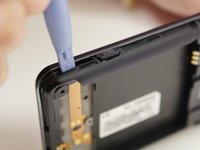
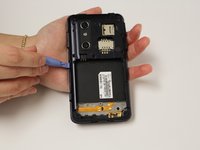
    1. LG Optimus 3D MicroSD/SIM Card Board Replacement, Back Cover Removal: step 1, image 1 of 2 LG Optimus 3D MicroSD/SIM Card Board Replacement, Back Cover Removal: step 1, image 2 of 2
      • Pry the back cover off of the phone with your fingernail. There is a notch located at the bottom of the phone for improved leverage.

      Ask FixBot

      Add Comment

    2. LG Optimus 3D MicroSD/SIM Card Board Replacement, Battery Removal: step 2, image 1 of 3 LG Optimus 3D MicroSD/SIM Card Board Replacement, Battery Removal: step 2, image 2 of 3 LG Optimus 3D MicroSD/SIM Card Board Replacement, Battery Removal: step 2, image 3 of 3
      • The battery is the large black rectangle towards the bottom half of the phone.

      • There is a semi-circular notch at the bottom edge of the battery. Press against and up on the battery to pop it out.

      Ask FixBot

      Add Comment

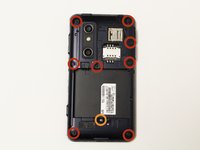
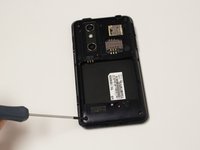
    1. LG Optimus 3D MicroSD/SIM Card Board Replacement, Screw Removal: step 3, image 1 of 2 LG Optimus 3D MicroSD/SIM Card Board Replacement, Screw Removal: step 3, image 2 of 2
      • Remove 9 screws from the phone. The locations of these screws are circled in the picture.

      • 5.5mm length PH00 screws

      • 4mm length PH00 screws

      Ask FixBot

      Add Comment

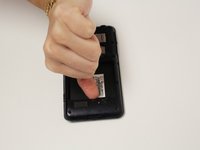
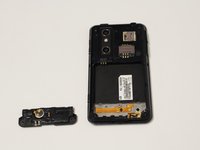
    2. LG Optimus 3D MicroSD/SIM Card Board Replacement, Bottom Cover Removal: step 4, image 1 of 2 LG Optimus 3D MicroSD/SIM Card Board Replacement, Bottom Cover Removal: step 4, image 2 of 2
      • Gently pull down on the bottom cover to remove it.

      Ask FixBot

      Add Comment

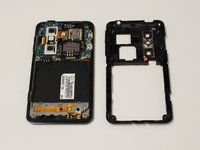
    3. LG Optimus 3D MicroSD/SIM Card Board Replacement, Mid-Cover Bezel Removal: step 5, image 1 of 3 LG Optimus 3D MicroSD/SIM Card Board Replacement, Mid-Cover Bezel Removal: step 5, image 2 of 3 LG Optimus 3D MicroSD/SIM Card Board Replacement, Mid-Cover Bezel Removal: step 5, image 3 of 3
      • Using a plastic opening tool, gently pry around the perimeter of the device.

      • The ribbons behind the buttons and ports are very delicate. Make sure you do not run your plastic opening tool too deep into the bezel, as you could damage them.

      • The button covers rest under the Mid-Cover Bezel. Remove them and set aside.

      Ask FixBot

      Add Comment

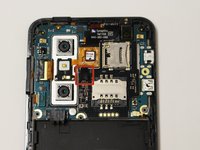
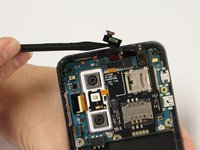
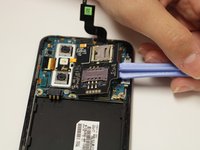
    4. LG Optimus 3D MicroSD/SIM Card Board Replacement, Ribbon Cable Disconnection: step 6, image 1 of 2 LG Optimus 3D MicroSD/SIM Card Board Replacement, Ribbon Cable Disconnection: step 6, image 2 of 2
      • Using a spudger or plastic opening tool, gently disconnect the ribbon cable attached to the black SIM card board.

      Ask FixBot

      Add Comment

    5. LG Optimus 3D MicroSD/SIM Card Board Replacement, Adhesive Loosening: step 7, image 1 of 1
      • Use a hair-dryer on high, or a heat-gun on low to heat the device and loosen the adhesive which holds down the SD/SIM Card Board.

      • Evenly heat the device in short intervals for about one minute.

      • Do not heat the device for more than 30 seconds at a time to prevent over-heating.

      Ask FixBot

      Add Comment

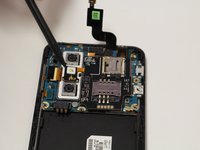
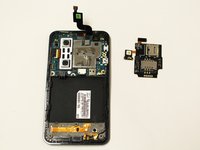
    6. LG Optimus 3D MicroSD/SIM Card Board Replacement, SD/SIM Card Board Removal: step 8, image 1 of 3 LG Optimus 3D MicroSD/SIM Card Board Replacement, SD/SIM Card Board Removal: step 8, image 2 of 3 LG Optimus 3D MicroSD/SIM Card Board Replacement, SD/SIM Card Board Removal: step 8, image 3 of 3
      • Gently pry the board up to release it from the now soft adhesive. Make sure you pry up the little tab connected to the camera unit as well.

      • If the board is too difficult to separate than more heating may be required.

      Ask FixBot

      Add Comment

Conclusion

To reassemble your device, follow these instructions in reverse order.

Cancel: I did not complete this guide.

Dale Pearson

Member since: 09/22/14

784 Reputation

6 Guides authored

Team

USF Tampa, Team 10-6, Brown Fall 2014 Member of USF Tampa, Team 10-6, Brown Fall 2014

USFT-BROWN-F14S10G6

3 Members

72 Guides authored

0 Guide Comments

Add Comment

View Statistics:

Past 24 Hours: 1

Past 7 Days: 1

Past 30 Days: 33

All Time: 1,411