
LG Neon GT 365 Keyboard Replacement

kristie and 9 other contributors
Last updated on Jun 26, 2024
Views: 828
View statistics:
- Past 24 Hours:
- 3
- Past 7 Days:
- 18
- Past 30 Days:
- 103
- All Time:
- 828
Comments: 0
No one has left comments on this guide. Will you be first?
Go to guide commentsCompleted: 0 1
No one has marked this guide "completed." Will you be the first?
1 person has marked this guide "completed." It's you — great job!
Favorites: 1 2
1 person has favorited (and subscribed to) this guide. Will you be next?
2 people have favorited (and subscribed to) this guide — including you!
Introduction
Go to step 1 ↓Has your LG Neon GT 365 phone's keyboard been malfunctioning? Perhaps the keyboard will not type the correct characters into the screen, or will not type anything at all. If so then this guide is for you.
The keyboard is responsible for typing all letters, numbers, and special characters onto this device's screen. If the keyboard is malfunctioning then there is no way to type on this semi-touchscreen device. If you're keyboard is active but not responding, try turning it off and then back. If that does not work, try to deep clean the keyboard and it's surrounding areas. If neither of those methods solve the issue then please continue to use this guide. Blowing some air on the surfaces of the device may help. Before starting this guide, please be sure to completely turn off this device to reduce the risk of it hurting you in any way. One last thing we recommend is to be at a flat and large desk to keep track of any small parts, such as screws.
Please refer to the following link to properly dispose of the malfunctioning keyboard. Properly disposing of electrical devices
What you need
Tools


-
-
-
With one hand, push the rectangular button located on the back top-side of the phone.
-
With your other hand, remove the rear cover.
 Ask FixBot
-
-
-
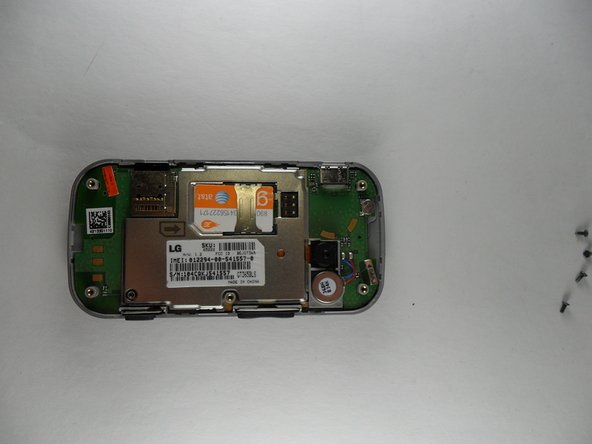
Remove 5 screws, 1 from each corner of the phone and 1 from the center-right of the phone.
-
-
-
Now pull off the rear casing, using an opening tool. **Buttons for volume and pictures may fall out**
-
-
-
Hold the circuit board and turn the phone upside down.
-
Then let the circuit board hang down so you can disconnect the ribbon by getting under an edge and popping it off. **the rubber keyboard may fall out**
-
-
-
-
Once the circuit board has been removed the rubber keypad will be visible. If it has not fallen out on its own it can simply be peeled out. It is lightly attached like a sticker on the top three tabs. The left most table is labeled “B”, the center tab is blank, and the right tab is labeled “N”.
-
-




To reassemble your device, follow these instructions in reverse order.

Team

UMass Dartmouth, Team 2-1, Gulbrandsen Fall 2013 Member of UMass Dartmouth, Team 2-1, Gulbrandsen Fall 2013
UMASSD-GULBRANDSEN-F13S2G1
4 Members
60 Guides authored
