Introduction
The battery is likely to malfunction if exposed to water, if it is overused, or if it was faultily made in the factory. If the phone refuses to turn on or is having other power-related issues, follow this guide to replace the battery.
What you need
-
-
-
Turn off the phone by pressing the power button, then press "Power Off", then press "OK" when notified that your phone will shut down.
 Ask FixBot
-
-
-
-
Flip the phone so that its back plate is facing upward.
-
Use your fingernail or prying tool to lift the back plate of the phone open by using the notch at the bottom.
-
-
-
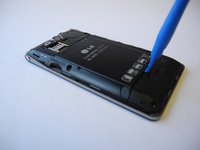
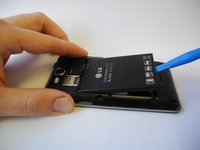
Using the notch located near the bottom center, remove the battery with a prying tool or your fingernail.
-
-


To reassemble your device, follow these instructions in reverse order.

Team

Ohio State, Team 1-1, Wilder Spring 2017 Member of Ohio State, Team 1-1, Wilder Spring 2017
OSU-WILDER-S17S1G1
4 Members
48 Guides authored
